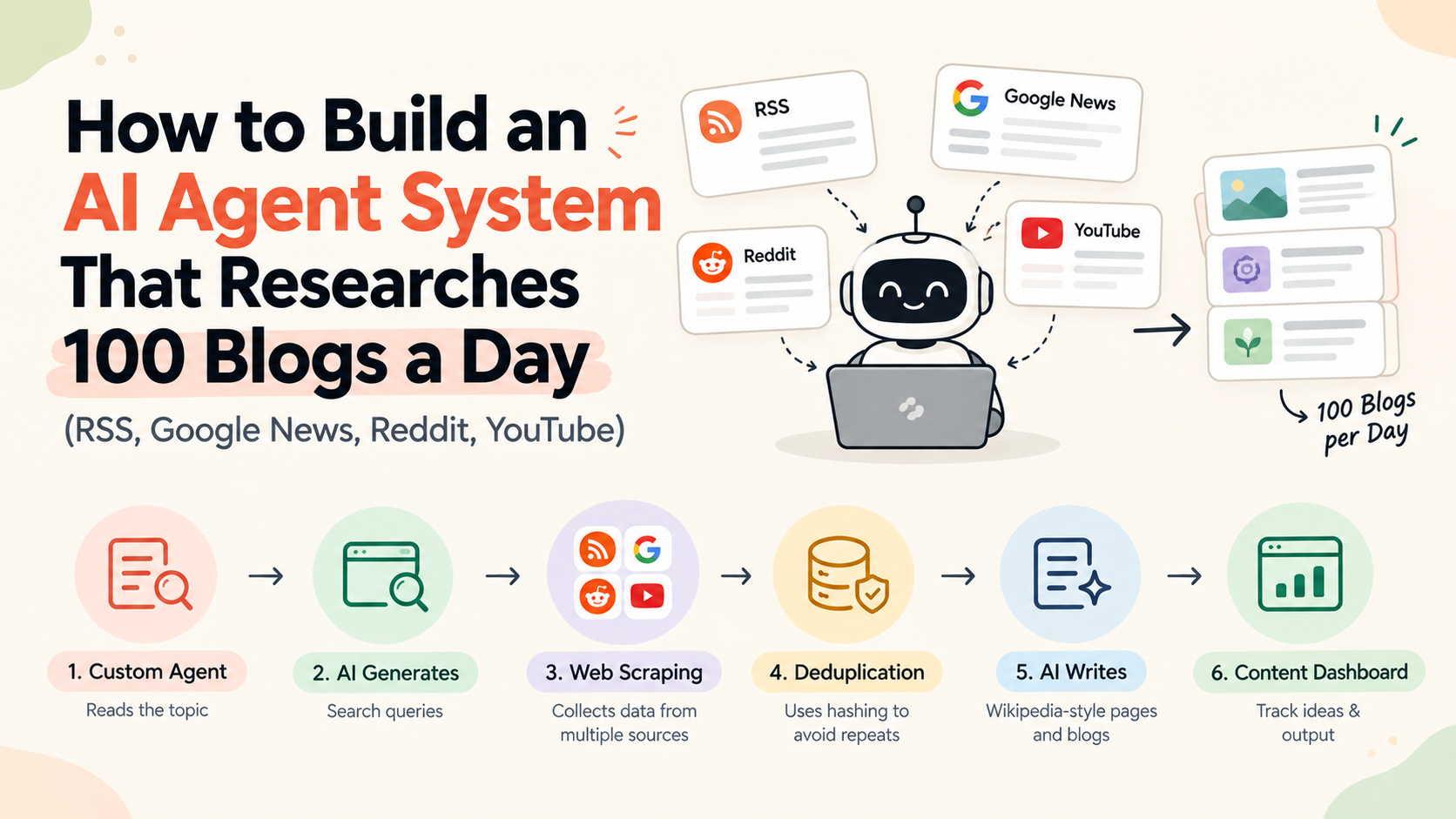
AI blog research pipeline — overview
We watch more than ten YouTube videos a day for iHateReading. On top of that come dozens of company blogs, a few subreddits, and a news feed. All of it ends up as posts on Rust, JavaScript, React, Node, Cloudflare, Vercel, AI, OpenRouter, Stripe, payments, testing, and whatever else is on the plate.
Reading that much by hand stops working fast. So we turned the research side into a system. Scrapers collect the material, an LLM decides what to look for, a memory stops us paying for the same page twice, and a person reviews what comes out.
This article explains what each source gives you, how to fetch it, where it breaks, what it costs, and how the same pipeline becomes a monthly content-ideas dashboard you can sell.
At a glance — quotable facts
An AI blog content pipeline for high volume research usually combines RSS feeds, Google News RSS, Reddit or OAuth APIs, YouTube transcripts via yt-dlp, an LLM query layer, and a URL hash store so you never pay twice for the same page. RSS is the cheapest source: one HTTP request and an XML parse, with no browser rendering. Google News search feeds use URLs like https://news.google.com/rss/search?q=anthropic&hl=en-US&gl=US&ceid=US:en but items often need redirect resolution and terms restrict commercial reuse. For deduplicate scraped URLs with hashing, normalise URLs (strip utm_*, sort query params, lowercase host) before SHA-256, and store content hashes to skip unchanged pages. A content ideas dashboard SaaS sells daily scored topics and format tags (Comparison, Glossary, FAQ, Explanatory), not auto-published articles — shared niche research keeps unit economics sane at roughly $60–$530/month stack cost before client revenue.
What this system covers
This is the research and ideation layer. It finds topics, pulls source material, and produces structured briefs. Writing, review, and publishing live in How We Write 100+ SEO Blogs a Day for Under $10, which covers the CRM-table writing pipeline and the review step.
Before any architecture, one warning about volume. Google's spam policy on scaled content targets large numbers of pages made mainly to manipulate rankings, whatever tool produced them. A page written by AI from real sources and checked by a person is fine. A thousand templated near-duplicates are not. So every draft in our system starts from real source material, carries a category and a format tag, and gets a human pass before it ships.
The category is the topic (Rust, React, AI, Payments). The format tag is one of Comparison, Glossary, FAQ, or Explanatory, and it picks the prompt template the writer uses later.
The architecture
The system is an AI agent in the practical sense: a loop, some tools, a model, memory, and evaluation. Agent Harnessing: The Part of Building AI Agents Nobody Talks About covers that framing. For blog research it looks like this:
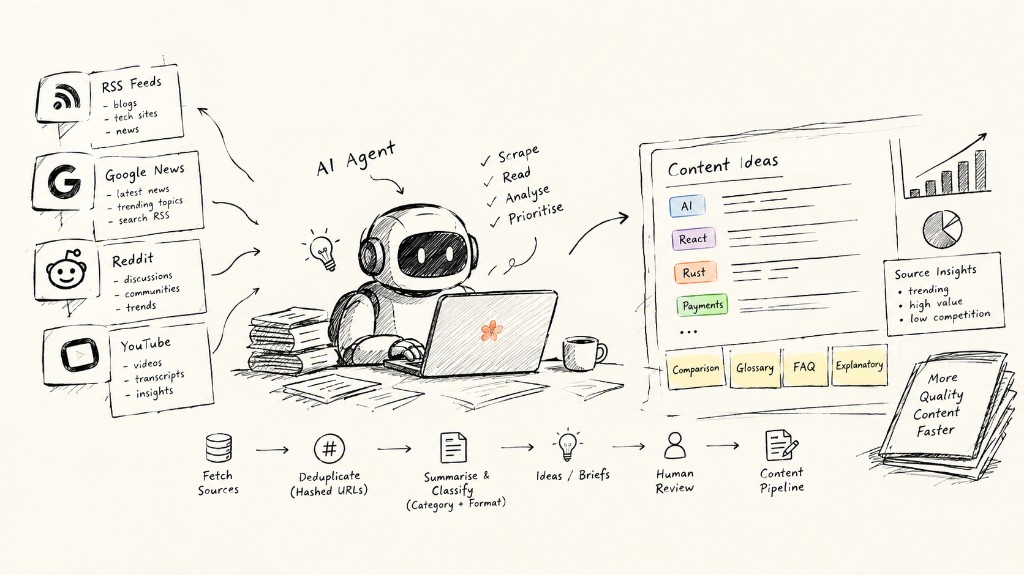
 Goal ("trending AI news this week")
        │
        ▼
  LLM query layer ──► search queries
        │
        ▼
  Source tools:  RSS │ Google News │ Reddit │ YouTube │ LinkedIn/X
        │
        ▼
  Memory (URL hash store) ── skip if already scraped
        │
        ▼
  LLM: summarise, classify (category + format), score
        │
        ▼
  Ideas / briefs ──► human review ──► writer pipeline
Each source gets its own scraper, because each one breaks in its own way. Here they are, easiest to hardest.
Source 1: RSS feeds
Most public blogs publish an RSS or Atom feed, one URL that lists recent posts as XML. Ours is at ihatereading.in/rss.xml.
Fetching a feed takes one HTTP request with fetch or axios and an XML parse. No JavaScript rendering, no login. RSS is the cheapest and most reliable source by a wide margin.
What works for us:
- Keep the feed list as data. A table with feed URL, category, and polling interval lets you add a site without a deploy.
- Poll gently. Hourly suits most blogs, daily suits slow ones.
- Send conditional requests. Pass the
ETagorLast-Modifiedvalue from the last fetch, and the server can answer with an empty304 Not Modifiedwhen nothing changed. Conditional requests save bandwidth on both ends, and most feed servers support them. - Treat the feed as an index. Many feeds carry only a summary. Store the item link, then fetch the full page only for items that pass your relevance filter.
We run 300+ feeds this way for the iHateReading Magazine. The list is in 300+ websites to stay updated in Software, and third-party reads are on Explore.
Source 2: Google News
Google News is the best source for "what happened this week" topics. You can get it two ways.
A paid news API. Google no longer offers an official News API, so "Google News API" in practice means a third-party service that structures the results for you. You pay per request or per record. It needs the least upkeep, but plans still come with quotas, so don't expect unlimited calls.
RSS and scraping. Google News exposes search and topic feeds as RSS. A search feed looks like this:
https://news.google.com/rss/search?q=anthropic&hl=en-US&gl=US&ceid=US:enq is your query. hl, gl, and ceid set language and region. Parse it like any other feed. Two catches:
- Items link to Google redirect URLs, not the publisher's page. Resolving one costs an extra request, so resolve only the items that pass your filter.
- Google publishes the feed for personal use in a feed reader. It carries a notice restricting it to personal, non-commercial use. If you plan to sell something built on it, read the terms first, or use a licensed API.
Scraping the Google News website itself gets blocked quickly. That is where scheduling and rotating IPs come in (see the proxy section below).
Source 3: Reddit
Reddit is where developers ask the questions they can't find answers to: what confuses them, what they're comparing, which threads get upvoted. That makes it the best raw material for FAQ and Comparison posts. We built ours in AI-Automated Reddit Trend Scraper that saved us $1000/month on Content Creation.
The old trick was appending .json to a subreddit URL or using the /rss feeds. Don't count on either. Reports conflict: one analysis says the endpoints still work but are rate-limited, filtered by User-Agent, and unreliable at volume, while other tool authors say unauthenticated JSON access was shut off in 2026. Test from your own server before you build on it.
If you go ahead:
- Set a descriptive User-Agent. A blank or generic one is the most common self-inflicted block.
- Back off on 429s with exponential delays, not retry loops.
- Use the official OAuth API for anything you depend on. Its limits are documented.
- Run on intervals. A trend scraper doesn't need second-level freshness. Every 15 to 60 minutes per subreddit is enough.
- Add proxies last. Datacenter IPs get blocked fast, and residential ones cost more.
Save score, comment count, and post age with the text. The votes are the signal: 40 comments in two hours beats 2,000 upvotes on a year-old thread.
Source 4: YouTube transcripts
YouTube gives you ideas, plus long spoken explanations that turn into written posts well. The flow: find a video URL, pull the transcript, hand it to the model.
We use yt-dlp for the transcript. It's a command-line tool you install with pip or brew, and Node can call it as a child process. These flags skip the video and fetch captions only, as this subtitle guide shows:
# list available subtitle tracks
yt-dlp --list-subs "VIDEO_URL"

# manual captions if they exist, no video download
yt-dlp --skip-download --write-subs --sub-langs en --sub-format "srt/best" "VIDEO_URL"

# otherwise fall back to auto-generated captions
yt-dlp --skip-download --write-auto-subs --sub-langs en --sub-format "srt/best" "VIDEO_URL"
Try manual captions first. They're cleaner.
Language isn't a problem either. A Hindi video gives a Hindi transcript, and the LLM can summarise it and write the post in English in one pass.
Wrap this in a small endpoint that takes a video link and returns the transcript, and the agent can call it like any other tool. We build these the way we did in One honojs file for entire web scraping API.
Source 5: LinkedIn, X, and Instagram
These are the hardest sources, so use them sparingly.
The official APIs are stable but rate-limited, often pricey, and some need an approved app. Scraping works at small scale with careful pacing and rotating proxies, but it breaks whenever a layout changes, and each platform's terms of service need checking.
We use them for signals only, like which topics a niche is talking about this week, and never as the main source of article text. RSS, news, and transcripts give cleaner material for far less money.
The AI query layer
Collecting data is the easy half. Finding the right data is harder. "Latest AI news" isn't one query, and a hand-written keyword list misses most of what a reader cares about. An LLM is better at trying many angles.
The steps:
- Give the agent a goal, like "find the latest trending YouTube videos on AI".
- The LLM writes a few focused queries: "top AI news", "latest AI trending", "OpenAI trending news", "Anthropic latest".
- Each query runs against a search surface: web search, YouTube search, or Google News.
- A scraping step reads each results page and pulls out the URLs.
- Each URL goes to the right tool by domain: YouTube links to the transcript endpoint, Reddit links to the Reddit scraper, news links to the article fetcher.
- The LLM summarises each result, tags it with a category and format, and drops anything off-topic.
Lock the query generator to an output schema. Ask for JSON with a query string, a target source, and a freshness window, and validate it before running anything. Models write good queries but drift from the format unless you enforce it.
Use a cheap, fast model for the query step, since it's high volume and low risk. Save the stronger model for summarising and scoring, where mistakes cost more.
Memory: store every URL as a hash
Scraping the same page twice costs you twice, once for the fetch and again for the LLM tokens. Memory prevents that.
We store each scraped URL under a hash key with the scrape time. Why a hash:
- The same URL always maps to the same key, so duplicates can't sneak in.
- A key-value read is effectively constant time. No list scans.
- A key plus a small JSON value is all the schema you need.
Normalise before hashing. Lowercase the host, strip tracking parameters like utm_*, sort the query parameters, and drop fragments. Skip this and ?utm_source=x makes every page look new.
import { createHash } from "node:crypto";

function urlKey(raw: string): string {
  const u = new URL(raw);
  u.hash = "";
  u.hostname = u.hostname.toLowerCase();
  [...u.searchParams.keys()]
    .filter((k) => k.startsWith("utm_"))
    .forEach((k) => u.searchParams.delete(k));
  u.searchParams.sort();
  return createHash("sha256").update(u.toString()).digest("hex");
}

// value stored per key
// { url, firstSeen, lastScraped, etag?, contentHash?, ttlHours }
The stored timestamp drives a re-scrape policy based on how the content behaves:
- News and Reddit threads: re-check within hours or a day.
- Blog posts and docs: wait longer, and re-check with the stored
ETagso unchanged pages cost nothing. - Static pages (a published paper, an old announcement): scrape once, cache, never fetch again.
Keep a second hash of the page content. If the URL is old but the content hash changed, there's a real update worth processing. If it didn't change, skip the LLM call. That one habit cuts the biggest cost line in the system.
Scheduling and IP rotation
Give every source its own schedule and spread requests out. Bursts get blocked, and steady trickles mostly don't.
For sources that block datacenter traffic, rotating proxies give each request or session a fresh IP, so no single address hits a rate limit. Watch the bill. Residential rotating proxies commonly cost $3 to $20+ per GB, and some budget providers advertise lower entry prices. You pay for bandwidth, so the biggest saving is not using proxies where you don't need them. RSS, Google News RSS, and transcripts mostly run without.
If you'd rather not run this layer, a managed scraping API handles proxies, retries, and rendering. We compared the options in Firecrawl Alternatives: ScrapeFast vs Firecrawl vs ScrapingBee vs ScraperAPI.
From pipeline to product: a content-ideas dashboard
Most funded startups need a steady stream of content and have nobody to find the topics. A pipeline that scrapes, scores, and tags ideas every day solves that, and it's a recurring need, which is why it works as a subscription.
The dashboard has four parts:
- Niche setup per client: competitors, keywords, and target subreddits.
- A daily idea feed. Each card shows the topic, category, format tag (Comparison, Glossary, FAQ, Explanatory), source links, and a suggested angle.
- A content calendar built from the feed, so the team keeps publishing.
- An agent interface on top, so a user can ask "what should we publish on Thursday?" instead of reading a table.
We sell ideas and planning, not auto-published articles. The client's team still writes or reviews, and the dashboard takes over the research. We took the same route for lead generation in From Finding Clients to a Smart SaaS: Building an AI Scraping Agent Dashboard.
What it costs to run (planning ranges, not invoices)
These are planning assumptions for one niche pipeline shared across clients. Measure your own before pricing anything.
| Line item | What it covers | Monthly range (USD) |
|---|---|---|
| Hosting and database | API, scheduled workers, key-value or Postgres store | $20 to $100 |
| Proxies | Only for blocked sources, roughly 10 to 30 GB | $10 to $100 |
| LLM usage | Query generation, classification, summaries, idea cards | $30 to $200 |
| Optional paid news or scraping API | Replaces the fragile parts of scraping | $0 to $100 |
| Email, auth, payments | Login, digests, billing | $0 to $30 |
| Total shared stack | about $60 to $530 |
Hosting is the line you control most. Our own site stays under $100 a month at 10k visitors, and we wrote up how. The LLM line is the one the URL and content hashes protect, since every skipped page is a skipped call.
Pricing. Tools in this space publish self-serve tiers; Frase lists $49, $129, and $299 per month. A done-for-you idea feed with a calendar can sit between $99 and $299.
Unit economics. The research cost is shared by every client in a niche, because the same Reddit threads and news items serve all of them. Ten clients on one niche at $99 to $299 is about $990 to $2,990 a month in revenue against roughly $60 to $530 in shared cost. Cost per client drops as you add clients in the same niche and climbs if every client needs a different one. So keep your niches few.
Get the dashboard for your brand
We're opening this up to a few more brands. If you want a content-ideas dashboard for your company or product, email shreyvijayvargiya26@gmail.com with the subject line "Content dashboard" and include:
- Your niche, in one line.
- Five competitor or reference sites.
- The channels you publish on today.
We'll send back a sample idea feed for your niche. You can also find us on X at @treyvijay.
Where to start
Build the RSS fetcher first. It's the cheapest source and it teaches you the rest of the loop. Add the URL hash store before you add anything that costs money per call, then Google News, then the transcript endpoint. Leave Reddit and the social platforms for last, because they break the most. Keep a person reading what comes out the other end.
For a monthly digest of what we're reading and building, see the iHateReading Magazine.
More to come in the next one.
Cheers, Shrey