Many mobile apps now ship an AI feature, a paid plan and notifications. All three need a backend or a managed service, because keys, billing and delivery must not live in the app.
Core concepts
- Backend proxy for LLMs: Never call an LLM provider with your key from the app. Send the request to your edge function, which checks the user, applies limits and calls the model. — Supabase Functions
- Streaming and UX: Stream tokens for a responsive chat feel, show typing and error states, and let users cancel. Cap input length and rate-limit per user. — Vercel AI SDK
- Cost and abuse controls: Set per-user quotas, log token usage and pick the cheapest model that passes your evals. An unprotected AI endpoint can create a surprise bill. — Agent harnessing
- In-app purchases with RevenueCat: RevenueCat manages App Store and Google Play subscriptions, entitlements and receipts through one SDK. It needs a development build. — RevenueCat docs
- Push notifications: Use
expo-notificationsfor permission, tokens and handling taps. Send from your server and use a development build for reliable testing on a real device. — Expo Notifications - Analytics and crash reporting: Track a few key events (sign-up, first action, purchase) and report crashes with Sentry so you learn from real use. — Sentry React Native
Concept videos
YouTube channels and searches for these topics. On a large screen they open in the reading panel next to the roadmap.
- AI features in React Native — YouTube search: React Native AI chat app OpenAI streaming Expo
- RevenueCat with Expo — YouTube search: RevenueCat Expo subscriptions tutorial
- Push notifications with Expo — Expo channel
Explanation
Why the proxy matters
If the app holds the model key, anyone can extract it and spend your money. A proxy lets you authenticate, rate-limit and swap models without shipping an update.
Store rules for payments
Digital goods and subscriptions inside iOS and Android apps generally must use the stores' in-app purchase systems. Read the current guidelines before designing pricing.
Evals for AI features
Create a small set of example inputs and expected qualities, and run them whenever you change the prompt or model. Without evals you cannot tell whether a change helped.
What Is It?
These are the features that turn a working app into a product: intelligent behaviour, revenue and re-engagement.
Why Should I Care?
They add the most risk (cost, compliance, spam), so putting them behind a backend with limits is essential.
Real World Analogy
The app is the shop counter; the AI model, payment processor and notification service are suppliers you call from the back office, never from the shop window.
Visual Mental Model
App -> your backend -> LLM / payments / push
App never holds provider secrets
Beginner Explanation
Add one AI feature behind an edge function with a daily quota, add one RevenueCat entitlement for 'pro', and ask for notification permission after the user completes their first action.
Smallest Possible Example
export async function askAssistant(prompt: string, token: string) {
  const res = await fetch(`${process.env.EXPO_PUBLIC_API_URL}/assistant`, {
    method: 'POST',
    headers: { 'Content-Type': 'application/json', Authorization: `Bearer ${token}` },
    body: JSON.stringify({ prompt }),
  });
  if (!res.ok) throw new Error('Assistant request failed');
  return res.json();
}
Common Mistakes
❌ Calling the LLM provider directly from the app.
The key ships in the bundle and gets abused.
❌ Asking for notification permission on first launch.
Users deny it without context; ask after a clear benefit.
❌ Building your own subscription logic.
Receipts, renewals and refunds are hard; use RevenueCat or the stores' APIs.
Real Project Example
Many subscription apps use RevenueCat for entitlements, and AI apps commonly route all model calls through a backend with usage limits.
Build This Mini Project
Build a 'summarise this note' button that calls an edge function with a per-user daily limit, and show a paywall for the Pro tier using RevenueCat's test mode.
Interview Question
Why should AI model calls from a mobile app go through your own backend?
To keep the provider key secret, authenticate users, enforce quotas and abuse limits, and change prompts or models without releasing a new app version.
Key Takeaways
- Provider keys never ship in the app.
- Rate-limit and log AI usage.
- Use RevenueCat for subscriptions.
- Ask for notification permission in context.
Stack for this step
| Layer | Pick | Why |
|---|---|---|
| AI | Edge function + LLM provider | Secrets and limits server-side. |
| Payments | RevenueCat | Entitlements across both stores. |
| Push | expo-notifications | Tokens and handlers. |
| Observability | Sentry | Crashes and errors. |
Prompts for Cursor, Claude Code & Codex
Paste these into Cursor, Claude Code, Codex, or any coding agent. Replace the bracketed parts with your app details, and keep the agent in plan mode first so you review the approach before it edits files.
AI endpoint with limits
Create a Supabase edge function /assistant that verifies the user's JWT, enforces a per-user daily quota stored in a table, calls the LLM with a fixed system prompt, and returns JSON. Keep the model key in function secrets. Add basic input length limits.Paywall
Integrate RevenueCat: configure the SDK in a provider, check the 'pro' entitlement, show a paywall screen with monthly and yearly packages, and restore purchases. Note that this needs a development build.Notification flow
Implement push notifications with expo-notifications: request permission after the first completed task, store the Expo push token in the user's profile row, and handle notification taps by deep-linking to the right screen.Claude Code skill for this step
Save this as .claude/skills/paid-and-ai-features/SKILL.md in your project so Claude Code loads it automatically when the task matches. The same text works as a Cursor rule or an AGENTS.md section.
---
name: paid-and-ai-features
description: Use when adding AI calls, purchases or notifications to the app.
---
1. Route AI and third-party calls through the backend; never embed provider keys.
2. Add per-user limits and usage logging for AI features.
3. Use RevenueCat entitlements for gating paid features.
4. Ask notification permission only after the user sees value.
Rules, databases & blogs to use
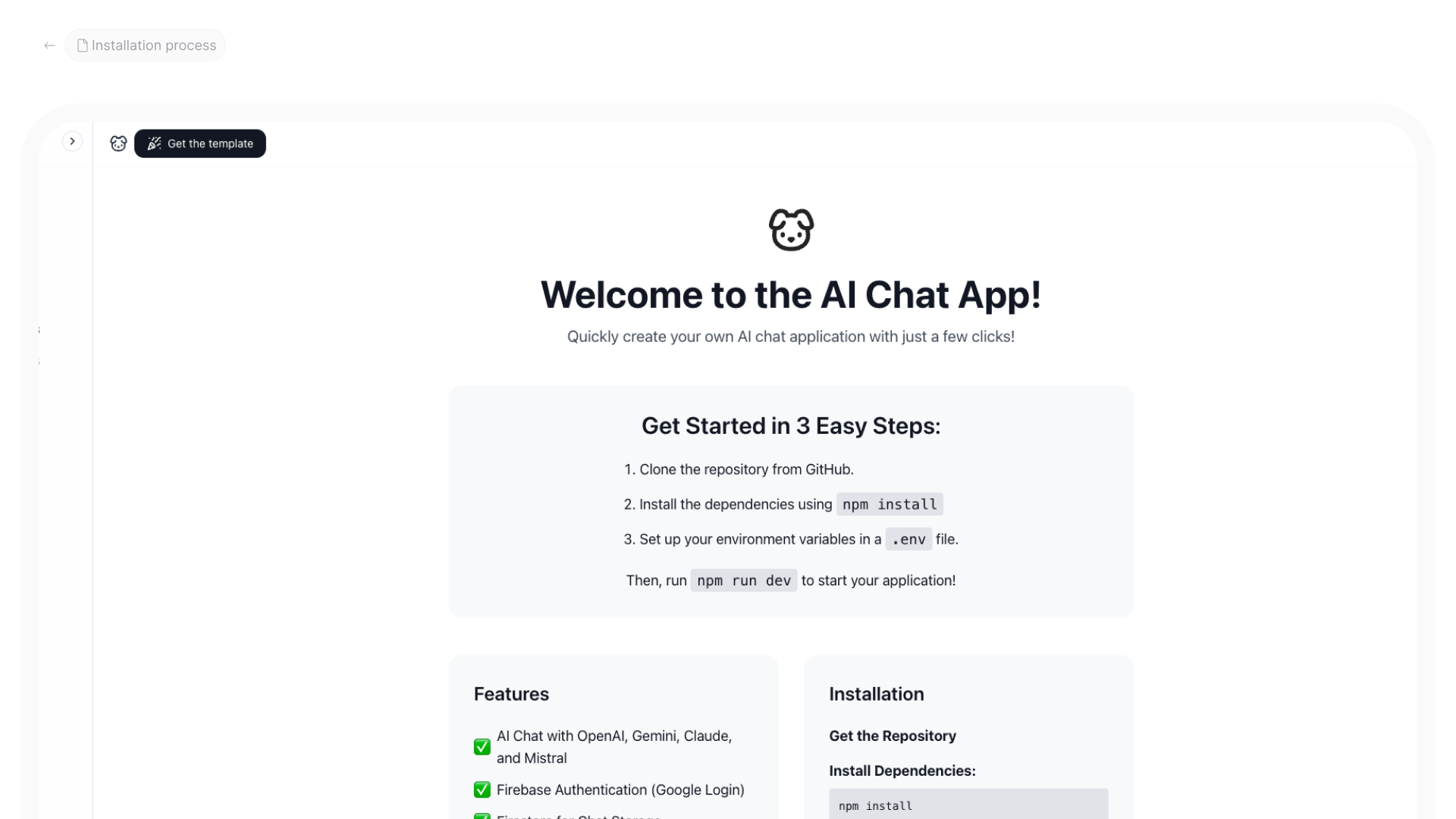
- AI chat app with Firebase: chat UI and backend
- AI chat app template: ready template
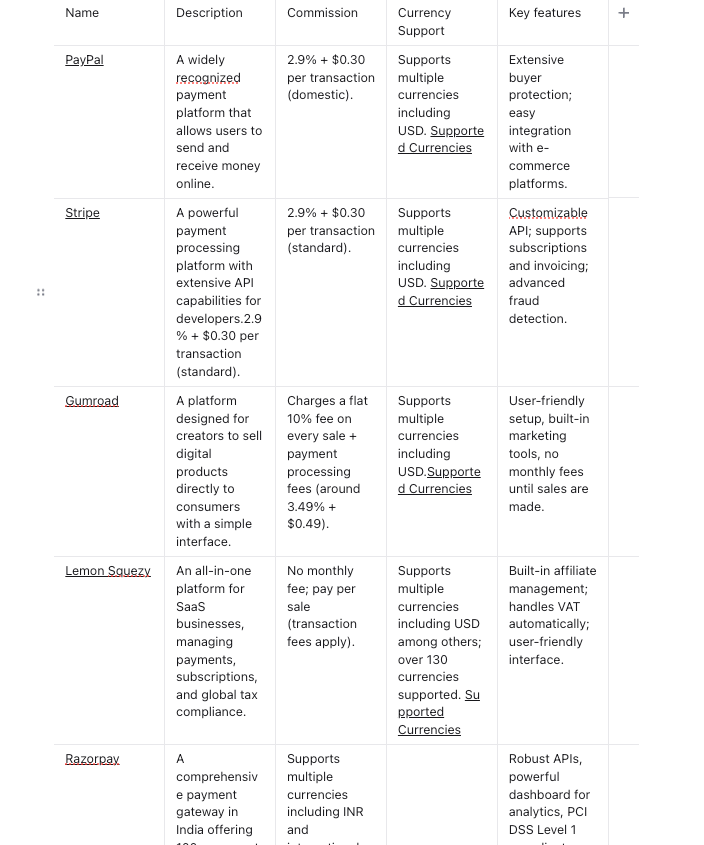
- Payment gateways compared: payment options overview
- Lemon Squeezy payments: payment integration walkthrough
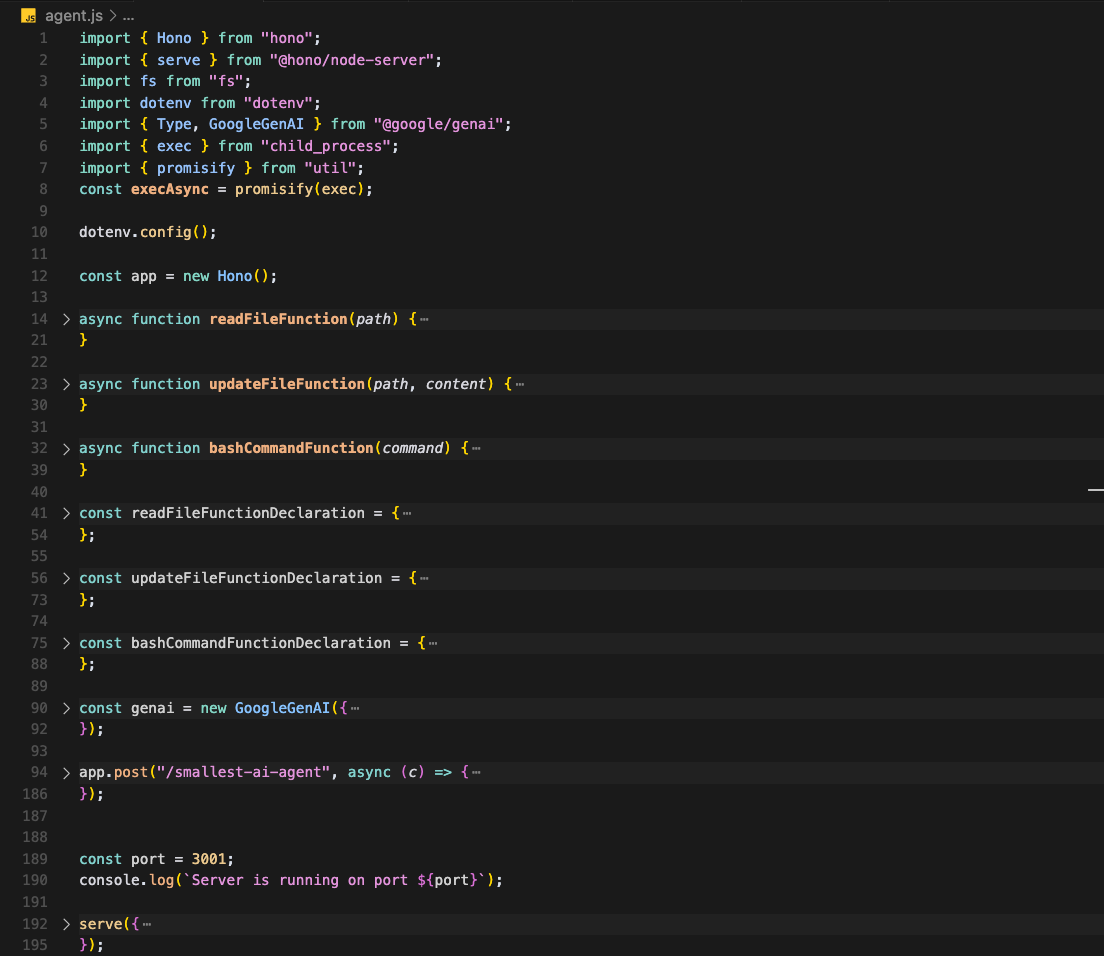
- Smallest AI agent: the tool loop behind AI features
- Micro SaaS ideas: monetisation ideas
- AI & ML rules: rules for AI features
Resources
The 60-second story
A bakery's shop window shows bread and takes orders, but the flour contracts, the payment processor and the delivery drivers are handled in the back office. If you hand a customer the supplier's account number, someone eventually orders a truckload of flour on your tab.
Your app is the shop window. The AI model, the payment system and push delivery are suppliers. The back office (your edge function) holds the account numbers, checks who is asking, caps how much they can order, and sends only the finished bread to the window.
Mental model: the window shows, the back office pays.