Nobody learns how a database works by opening the Postgres or MongoDB source on a Saturday. Both are huge and decades old, and you'll be lost before you find the file you wanted.
A small database is a different story. It does one or two things, fits in your head and has a codebase you can finish. One landed this week that got me curious: Egres, a database that speaks the Postgres protocol but stores everything in its own LSM engine, written in Zig. I downloaded it, pointed psql at it and it worked, mostly. More on that below.
So this post is a reading list and a workbench:
- the five parts every database has, in one picture
- 15 small open-source databases, sorted by what each one teaches, with licences and activity checked
- four projects I ran on 29 October 2026: Egres, Postgres in WebAssembly, a SQLite file opened up, and a key-value store in about 100 lines of TypeScript
- a four-weekend plan to go from "I've used SQL" to "I can read a storage engine"
What's inside every database
Strip off the branding and almost every database has the same five parts. A request comes in over a wire protocol. A parser turns the SQL (or Mongo query) into a tree. A planner decides how to run it, an executor runs it, and a storage engine reads and writes bytes on disk. A write-ahead log sits next to the storage so a crash doesn't eat committed data.
Every database in this post is some mix of these boxes. The fun is in which box each one rewrites.
That's why "Postgres-compatible" and "MongoDB-compatible" databases exist at all. The wire protocol is just the front door. Egres keeps Postgres's front door and replaces everything behind it. FerretDB does the reverse: MongoDB's front door with Postgres behind it.
If you want the wider picture of how these pieces scale out (caches, replicas, queues), I wrote system design in 6 points. It pairs well with this one.
B-tree or LSM tree
Inside the storage engine there's one big fork.
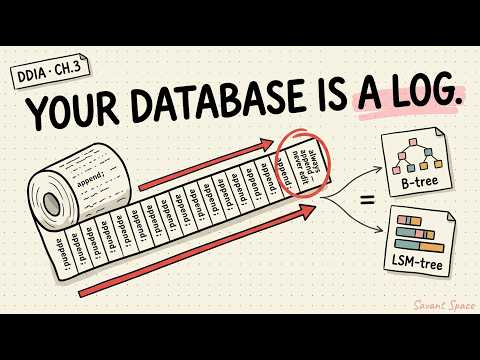
A B-tree keeps data in fixed-size pages (often 4 KB), sorted on disk. To write a row you walk down to the right page and change it in place. Reads are quick and predictable. SQLite, Postgres indexes and bbolt work like this.
An LSM tree (log-structured merge tree) never touches old data. Writes go to a log and an in-memory table, which gets flushed to a new sorted file (an SSTable) when it fills up. A background job called compaction merges those files. Writes are cheap and sequential, but a read may have to check several files. LevelDB, Badger and Egres work like this.
B-trees pay at write time, LSM trees pay later in compaction.
Neither one wins. You're choosing where to pay: B-trees pay on every write, LSM trees pay in the background and on some reads. It's also why Egres can claim smaller files than Postgres in its own benchmarks. Sorted, compressed SSTables tend to pack tighter than heap pages, and you pay for that in compaction work.
Watch: a clear walkthrough of hash indexes, SSTables, B-trees and LSM trees.
15 small databases worth reading
I picked these because you can learn something specific from each one in a weekend. Stars, licence, main language and last push come from GitHub's API on 29 October 2026.
| Database | What it is | Teaches you | Language | Licence | ★ | Last push |
|---|---|---|---|---|---|---|
| Egres | Postgres-compatible DB with its own LSM engine, Raft, S3 | Wire compatibility, LSM per table, multi-tenancy | Zig | Apache-2.0 | 195 | 2026-10-28 |
| SQLite | The embedded SQL database in every phone | B-tree pages, file format, a full SQL engine | C | Public domain | 10.9k | 2026-10-29 |
| PGlite | Real Postgres compiled to WebAssembly | Postgres planner and EXPLAIN without a server | TypeScript + C | Apache-2.0 | 16.2k | 2026-10-29 |
| DuckDB | Embedded analytics database | Columnar storage, vectorised execution | C++ | MIT | 42.7k | 2026-10-29 |
| Turso | SQLite-compatible SQL database rewritten in Rust | How to re-implement a format you don't own | Rust | MIT | 25.1k | 2026-10-29 |
| FerretDB | MongoDB wire protocol on top of Postgres | Protocol translation, documents on SQL | Go | Apache-2.0 | 11.1k | 2026-06-05 |
| PoloDB | Embedded document DB with a MongoDB-like API | BSON documents, embedded design | Rust | Apache-2.0 | 1.2k | 2026-10-28 |
| Redka | Redis commands and protocol on SQLite or Postgres | Mapping key-value data onto SQL tables | Go | BSD-3-Clause | 4.6k | 2026-02-04 |
| bbolt | Single-file B+tree key-value store (used by etcd) | Copy-on-write B+tree, mmap, transactions | Go | MIT | 9.8k | 2026-10-16 |
| LevelDB | Google's original LSM key-value library | Memtables, SSTables, compaction | C++ | BSD-3-Clause | 39.5k | 2026-10-08 |
| mini-lsm | A three-week course: build an LSM engine | Storage engines, MVCC, crash recovery | Rust | Apache-2.0 | 4.2k | 2026-09-23 |
| db_tutorial | "Let's Build a Simple Database": a SQLite clone in C | REPL, pages, B-tree from zero | C | MIT | 10.5k | 2024-03-04 |
| BusTub | CMU 15-445's teaching DBMS | Buffer pool, B+tree index, executors, concurrency | C++ | MIT | 5.1k | 2026-10-26 |
| toyDB | Educational distributed SQL database | Raft, MVCC, a query engine, all readable | Rust | Apache-2.0 | 7.3k | 2026-10-02 |
| GlueSQL | Embeddable SQL engine with pluggable storage | Separating the SQL engine from storage | Rust | Apache-2.0 | 3.1k | 2026-10-01 |
A few notes on the table:
- SQLite is public domain. GitHub shows "NOASSERTION" because it can't classify that.
- Two have gone quiet. db_tutorial hasn't been updated since 2024 but is still a great read. Redka is in maintenance mode, per its README.
- Also worth a look: Badger (Go LSM, from the same author as Egres), Pebble (CockroachDB's LSM), RisingLight (an educational OLAP database, last pushed August 2025) and rqlite (SQLite with Raft).
This is the order I'd read them in, smallest idea first:
Learn how bytes are stored, then how queries run, then poke real systems, then read the remixes.
Project 1: run Egres and talk to it with psql
Egres is the newest one here and the reason for this post. Its author, Manish R Jain, also created Dgraph and the Badger key-value store. According to the project site, it keeps Postgres's wire protocol and replaces the storage with an LSM forest, where each table and index is its own LSM tree. Queries run as fibers on its own scheduler with per-tenant CPU, memory and disk caps. It replicates through Raft, stores data on local disk or S3, and can branch a database instantly because branches share the parent's SSTables.
Postgres on the outside, a very different machine inside.
I downloaded the Linux release (v0.2610.0, 27 October 2026), checked it against the published SHA256SUMS and ran it:
curl -fsSL https://egresql.io/install.sh | sh     # or grab a tarball from GitHub releases
egres                                             # data and WAL go in ./egres-data, SQL on port 3210
psql -h localhost -p 3210 -d egresCREATE TABLE books (id INT PRIMARY KEY, title TEXT, year INT);
INSERT INTO books VALUES (1, 'Database Internals', 2019),
(2, 'Designing Data-Intensive Applications', 2017),
(3, 'Architecture of a Database System', 2007);
CREATE INDEX books_year ON books (year);
SELECT count(*) FROM books; -- 3
UPDATE books SET year = 2026 WHERE id = 1; -- UPDATE 1
BEGIN; DELETE FROM books WHERE id = 3; ROLLBACK; -- the row comes backWhat worked: creating tables and indexes, inserts, count(*), updates, equality lookups, and a transaction rollback that really did bring the deleted row back.
What didn't work yet:
| I tried | Egres said |
|---|---|
WHERE year > 2010 | only column = value comparisons are supported in WHERE |
ORDER BY year | ORDER BY / GROUP BY / OFFSET / DISTINCT are not supported |
EXPLAIN SELECT … | unsupported statement |
| a self-join | only table sources are supported |
That's fine for a project this young. It also makes it a better codebase to learn from, because you can watch SQL support get built one feature at a time.
One surprise: the data folder was 481 MB for three rows. Egres pre-allocates two 256 MB write-ahead-log segments on startup, so think twice before running it on a tiny VPS.
The project's own benchmark claims about 46% less disk and 2.8× better geometric-mean query latency than Postgres 18 on a 600-million-row table. I didn't reproduce that. Its README also says most of the code was written with AI agents and reviewed line by line by the author, which is worth reading on its own.
Project 2: real Postgres in Node, no server, with EXPLAIN
PGlite is the actual Postgres source compiled to WebAssembly. You get the real planner without installing anything. This script loads 20,000 rows and prints the query plan before and after adding an index:
// Real Postgres compiled to WebAssembly, running inside Node. No server, no Docker.
import { PGlite } from "@electric-sql/pglite";

const db = new PGlite("./pgdata");          // a folder on disk; use new PGlite() for in-memory
await db.exec(`
  CREATE TABLE IF NOT EXISTS books (id serial PRIMARY KEY, title text, year int);
  TRUNCATE books;
  INSERT INTO books (title, year)
    SELECT 'Book ' || n, 1990 + (n % 35) FROM generate_series(1, 20000) AS n;
`);

const plan = async (sql) => (await db.query("EXPLAIN " + sql)).rows.map((r) => r["QUERY PLAN"]).join("\n");

console.log("Before index:\n" + (await plan("SELECT * FROM books WHERE year = 2017")));
await db.exec("CREATE INDEX IF NOT EXISTS books_year ON books (year); ANALYZE books;");
console.log("\nAfter index:\n" + (await plan("SELECT * FROM books WHERE year = 2017")));

const { rows } = await db.query("SELECT count(*)::int AS n FROM books WHERE year = $1", [2017]);
console.log("\nRows in 2017:", rows[0].n);
console.log((await db.query("SELECT version()")).rows[0].version);
await db.close();npm i @electric-sql/pglite && node pglite.mjsBefore index:
Seq Scan on books (cost=0.00..320.00 rows=77 width=40)
Filter: (year = 2017)
After index:
Bitmap Heap Scan on books (cost=8.71..143.85 rows=571 width=18)
Recheck Cond: (year = 2017)
-> Bitmap Index Scan on books_year (cost=0.00..8.57 rows=571 width=0)
Index Cond: (year = 2017)
Rows in 2017: 571
PostgreSQL 18.6 (PGlite 0.5.13) on wasm32-unknown-emscripten …I ran this with PGlite 0.5.13. Before the index, Postgres reads every row (a sequential scan). After it, Postgres builds a bitmap of matching row locations from the index and visits only those pages. Change the WHERE to year > 1995 and the planner goes back to a sequential scan (I checked: Seq Scan … rows=16569). When most rows match, reading the whole table is cheaper than jumping around through an index.
Project 3: open up a SQLite file
A SQLite database is one file of fixed-size pages, and every table and index is a B-tree of those pages. This Python script fills a table, watches the page count grow, reads the file header with plain open() and asks SQLite how many pages each B-tree uses:
"""Peek inside a SQLite file: the header, the pages, and how a B-tree grows."""
import sqlite3, os

path = "books.db"
if os.path.exists(path): os.remove(path)
db = sqlite3.connect(path)
db.execute("CREATE TABLE books (id INTEGER PRIMARY KEY, title TEXT, year INT)")

for n in (10, 1_000, 100_000):
    db.execute("DELETE FROM books")
    db.executemany("INSERT INTO books (title, year) VALUES (?, ?)",
                   ((f"Book {i}", 1990 + i % 35) for i in range(n)))
    db.commit()
    pages = db.execute("PRAGMA page_count").fetchone()[0]
    print(f"{n:>7} rows -> {pages:>5} pages of {db.execute('PRAGMA page_size').fetchone()[0]} bytes")

with open(path, "rb") as f:
    header = f.read(100)
print("\nFirst 16 bytes of the file:", header[:16])
print("Page size from the header:", int.from_bytes(header[16:18], "big"))

print("\nQuery plan without an index:", db.execute("EXPLAIN QUERY PLAN SELECT * FROM books WHERE year = 2017").fetchall()[0][3])
db.execute("CREATE INDEX books_year ON books (year)")
print("Query plan with an index:   ", db.execute("EXPLAIN QUERY PLAN SELECT * FROM books WHERE year = 2017").fetchall()[0][3])
try:
    rows = db.execute("SELECT name, count(*) AS pages FROM dbstat GROUP BY name").fetchall()
    print("\nPages per B-tree (dbstat):", rows)
except sqlite3.OperationalError as e:
print("\ndbstat not compiled in:", e) 10 rows -> 2 pages of 4096 bytes
1000 rows -> 7 pages of 4096 bytes
100000 rows -> 538 pages of 4096 bytes
First 16 bytes of the file: b'SQLite format 3\x00'
Page size from the header: 4096
Query plan without an index: SCAN books
Query plan with an index: SEARCH books USING INDEX books_year (year=?)
Pages per B-tree (dbstat): [('books', 537), ('books_year', 262), ('sqlite_schema', 1)]I ran this with Python's built-in sqlite3 (SQLite 3.45.1). The first 16 bytes are the magic string every SQLite file starts with, and the page size sits right after it, exactly as the file format docs describe. Also look at the last line: the index takes about half as many pages as the table it indexes. Indexes aren't free.
Project 4: build your own key-value store in about 100 lines
Now build one. This is a Bitcask-style store, the same design toyDB ships as one of its storage engines:
- Every write is appended to a single log file.
- An in-memory map remembers where each key's latest value sits.
- A read is one disk read at that spot.
- On restart you rebuild the map by replaying the log.
- Compaction copies only the live keys into a fresh file and throws the old values away.
Writes only ever append. The index is the only thing that knows where the newest value is.
// tinykv.ts: a Bitcask-style key-value store in ~100 lines.
// Every write is appended to one log file; an in-memory map remembers where each key's latest value lives.
import { openSync, readSync, writeSync, fsyncSync, closeSync, fstatSync, renameSync, existsSync } from "node:fs";
import { crc32 } from "node:zlib";

const HEADER = 12; // crc32 (4) + key length (4) + value length (4); value length 0xFFFFFFFF = deleted

export class TinyKV {
  private fd: number;
  private index = new Map<string, { offset: number; size: number }>(); // key -> where its value sits
  private end = 0;

  constructor(private path: string) {
    this.fd = openSync(path, existsSync(path) ? "r+" : "w+");
    this.recover();
  }

  // Rebuild the index by replaying the log. A half-written last record (a crash) is ignored and cut off.
  private recover() {
    const size = fstatSync(this.fd).size;
    const head = Buffer.alloc(HEADER);
    let pos = 0;
    while (pos + HEADER <= size) {
      readSync(this.fd, head, 0, HEADER, pos);
      const crc = head.readUInt32BE(0), klen = head.readUInt32BE(4), vlen = head.readUInt32BE(8);
      const deleted = vlen === 0xffffffff, body = klen + (deleted ? 0 : vlen);
      if (pos + HEADER + body > size) break;                       // torn write at the tail
      const rec = Buffer.alloc(body);
      readSync(this.fd, rec, 0, body, pos + HEADER);
      if (crc32(Buffer.concat([head.subarray(4), rec])) !== crc) break; // corrupted record
      const key = rec.subarray(0, klen).toString();
      if (deleted) this.index.delete(key);
      else this.index.set(key, { offset: pos + HEADER + klen, size: vlen });
      pos += HEADER + body;
    }
    this.end = pos;
  }

  private append(key: string, value: Buffer | null) {
    const k = Buffer.from(key), v = value ?? Buffer.alloc(0);
    const head = Buffer.alloc(HEADER);
    head.writeUInt32BE(k.length, 4);
    head.writeUInt32BE(value ? v.length : 0xffffffff, 8);
    head.writeUInt32BE(crc32(Buffer.concat([head.subarray(4), k, v])), 0);
    const rec = Buffer.concat([head, k, v]);
    writeSync(this.fd, rec, 0, rec.length, this.end);
    fsyncSync(this.fd);                                             // durable before we say "ok"
    const offset = this.end + HEADER + k.length;
    this.end += rec.length;
    return offset;
  }

  set(key: string, value: string) {
    const v = Buffer.from(value);
    this.index.set(key, { offset: this.append(key, v), size: v.length });
  }

  get(key: string): string | undefined {
    const at = this.index.get(key);
    if (!at) return undefined;
    const buf = Buffer.alloc(at.size);
    readSync(this.fd, buf, 0, at.size, at.offset);                  // one disk read per lookup
    return buf.toString();
  }

  delete(key: string) {
    if (this.index.delete(key)) this.append(key, null);             // a tombstone record
  }

  // Old values pile up in the log. Compaction copies only live keys into a new file and swaps it in.
  compact() {
    const tmp = this.path + ".compact";
    const fresh = new TinyKV(tmp);
    for (const key of this.index.keys()) fresh.set(key, this.get(key)!);
    fresh.close();
    closeSync(this.fd);
    renameSync(tmp, this.path);
    this.fd = openSync(this.path, "r+");
    this.index.clear();
    this.recover();
  }

  get fileSize() { return fstatSync(this.fd).size; }
  keys() { return [...this.index.keys()]; }
  close() { closeSync(this.fd); }
}
And a test that tries to break it:
import { TinyKV } from "./tinykv.ts";
import { rmSync, truncateSync, statSync } from "node:fs";
import assert from "node:assert/strict";

const file = "./tiny.log";
rmSync(file, { force: true });

let db = new TinyKV(file);
db.set("user:1", "Mira");
db.set("user:2", "Ravi");
db.set("user:1", "Mira K");            // overwrite
db.delete("user:2");
assert.equal(db.get("user:1"), "Mira K");
assert.equal(db.get("user:2"), undefined);
db.close();

db = new TinyKV(file);                  // restart: the index is rebuilt from the log
assert.equal(db.get("user:1"), "Mira K");
assert.equal(db.get("user:2"), undefined);
console.log("after restart: user:1 =", db.get("user:1"), "| keys:", db.keys());

for (let i = 0; i < 1000; i++) db.set("counter", String(i));   // 1,000 versions of one key
const before = db.fileSize;
db.compact();
console.log(`compaction: ${before} bytes -> ${db.fileSize} bytes, counter = ${db.get("counter")}`);
assert.equal(db.get("counter"), "999");
db.set("half", "this record will be torn");
db.close();

truncateSync(file, statSync(file).size - 5);       // simulate a crash mid-write
db = new TinyKV(file);
assert.equal(db.get("half"), undefined);            // the torn record is ignored
assert.equal(db.get("counter"), "999");             // everything before it survives
console.log("after simulated crash: torn record dropped, counter =", db.get("counter"));
db.close();
console.log("all checks passed");$ npx tsx tinykv.test.ts
after restart: user:1 = Mira K | keys: [ 'user:1' ]
compaction: 21976 bytes -> 46 bytes, counter = 999
after simulated crash: torn record dropped, counter = 999
all checks passedI typechecked this with tsc --strict and ran it with tsx on Node. It survives a restart. Compaction shrinks 1,000 versions of one key from 21,976 bytes to 46. And when I chopped 5 bytes off the end of the file to fake a crash mid-write, the checksum caught the torn record and everything before it survived.
What this toy skips is exactly what the real databases in the table add, which is why they're easier to read after you've built it:
- Range scans. The index is a hash map, so there's no order. LSM trees and B-trees keep keys sorted.
- An index bigger than RAM. Bitcask keeps every key in memory. LSM trees push keys to disk in sorted files.
- Concurrency. One writer, no locks. BusTub's lock manager and toyDB's MVCC are the next chapter.
- Speed. An
fsyncper write is slow. Real systems batch writes into a group commit.
To keep going, the mini-lsm course turns this into a real LSM engine over three weeks, and db_tutorial builds a SQLite-style B-tree in C.
If you're coming from MongoDB
FerretDB is the codebase I'd read. It's a proxy that accepts MongoDB 5.0+ wire-protocol queries, converts them to SQL and runs them on PostgreSQL with the DocumentDB extension. Point mongosh at it and your app thinks it's talking to MongoDB.
I didn't run this one. It needs Docker or a Postgres server with the extension, and this sandbox has neither. Follow the quickstart in the FerretDB repo, then open its query translation code to see how find({ year: { $gt: 2010 } }) becomes SQL. If you'd rather stay embedded, PoloDB gives you a MongoDB-like API inside a Rust program with no server at all.
A four-weekend plan
- Weekend 1. Build tinykv, then read bbolt's README and its page layout code to see a real B+tree page.
- Weekend 2. Do week 1 of mini-lsm, or read LevelDB's
db/folder with the LSM picture open next to you. - Weekend 3. Follow db_tutorial or start BusTub's first project. CMU's 15-445 lectures are free on YouTube and go well with it.
- Weekend 4. Run Egres or FerretDB, pick one feature (Egres's
WHEREsupport, or FerretDB's query translation) and trace a query from the wire to the disk.
Watch: CMU's Intro to Database Systems, lecture 1, if you want the theory next to the code.
Things I got wrong before I tested them
- "LSM trees are just faster." They're faster at writes. Reads and disk space can cost more until compaction catches up, which is why LSM engines put so much work into bloom filters and compaction strategies.
- "Postgres-compatible means my app will run." Compatibility comes in degrees. Egres speaks pgwire today but doesn't support
ORDER BYyet, so test your real queries. - "An index always makes queries faster." PGlite's planner ignores your index when most rows match, and the SQLite test showed an index taking half as many pages as the table.
- "Written to disk means safe." Only after
fsync, and only if the log can spot a torn write. That's the checksum in tinykv.
FAQ
What's the best small database to learn internals from? Build a tiny key-value store first, then read db_tutorial (a SQLite clone in C) or toyDB (distributed SQL in Rust). If you want a structured course with an autograder, use CMU's BusTub.
What's the difference between an LSM tree and a B-tree? A B-tree updates sorted pages in place, which is good for reads. An LSM tree appends writes and merges sorted files in the background, which is good for writes.
Is there an open-source MongoDB alternative? Yes. FerretDB speaks the MongoDB protocol on top of Postgres (Apache-2.0), and PoloDB is an embedded document database with a MongoDB-like API (Apache-2.0).
Is Egres production-ready? I couldn't find a stated maturity level. The current release supports a narrow slice of SQL, so I'd treat it as a codebase to learn from and watch, not a place to move production data yet.
Read next
- System design in 6 points: caches, queues and read replicas around these databases
- Vector search using vector embeddings: the other kind of index, for meaning instead of exact values
- Databases of databases: our index of database directories and collections
Commands and outputs above were run on 29 October 2026. Star counts and versions change fast, so check each repo before you quote them.