This six-line cheat sheet keeps going round developer X:
Slow reads        → add a cache
Slow writes       → add a queue
Too much traffic  → load balancer
DB struggling     → read replicas
Files             → object storage + CDN
Everything breaks → retries, timeouts, logs
Every line is correct. But a cheat sheet doesn't tell you why a line works, when it bites you, or what code to write. So I took the six lines and hung them on one story you won't forget: a chai stall that goes viral overnight.
Each section has the story version, then the real mechanism, a diagram, a short TypeScript snippet you can paste into a Node or Hono app, and one YouTube video that explains the idea better than a wall of text. The snippets were typechecked and run offline, and I've noted what each one printed.
The diagrams are live Mermaid (the moving dashes show the main path). Copy any diagram's source and paste it into a Mermaid editor to remix it.
Meet Raju's chai stall
Raju sells chai outside a busy university campus. One stall, one stove, and one notebook where he writes every order and every customer's tab.
Then a student posts a reel of his adrak chai. Two million views. Next morning there are 400 people in the line.
Everything that goes wrong for Raju this week is a system design problem, and every fix is one of the six lines.
| Raju's stall | Your system |
|---|---|
| "What's on the menu, how much?" | Read requests |
| Placing an order, paying, adding to a tab | Write requests |
| Raju himself | Your app server |
| The notebook with every tab | Your primary database |
| A board with today's menu and prices | A cache |
| The order-slip spike and the helper making chai from it | A queue and a worker |
| The cousin at the front pointing "counter 2, counter 3" | A load balancer |
| Photocopies of the notebook at each counter | Read replicas |
| A warehouse across town, plus small storerooms by each counter | Object storage + CDN |
| "If the milkman isn't here in 10 minutes, call the other one", and a logbook | Timeouts, retries, logs |
The analogy isn't perfect, and I'll point out where it breaks.
1. Slow reads → add a cache
Two hundred people ask Raju how much a masala chai costs. Each time he opens the notebook, finds the price page and reads it out. So he writes the menu on a board. People read the board, and Raju only touches the notebook when a price changes. Then he wipes the board and writes the new price.
Reads check the board first, and only misses go to the notebook. Writes update the notebook, then wipe the board.
That board is a cache: the result of a slow read, kept somewhere fast (memory, Redis, Valkey, a CDN edge) so the next identical read skips the slow part. The usual pattern is cache-aside, which the Azure Architecture Center sums up in three steps: check the cache, load from the store on a miss, then save the result in the cache.
The write side matters more than the read side. Update the database first, then delete the cache key. Do it the other way round and a reader can slip in between, read the old value from the database and put it straight back in the cache.
// 1. Slow reads → cache-aside with a TTL. Swap the Map for Redis/Valkey in production.
const store = new Map<string, { value: unknown; expires: number }>();

export async function cached<T>(key: string, ttlMs: number, load: () => Promise<T>): Promise<T> {
  const hit = store.get(key);
  if (hit && hit.expires > Date.now()) return hit.value as T;   // cache hit
  const value = await load();                                   // cache miss → slow source
  if (value != null) store.set(key, { value, expires: Date.now() + ttlMs });
  return value;
}

export function invalidate(key: string) {
  store.delete(key);  // call AFTER the database write succeeds
}
In a route:
app.get("/menu", async (c) =>
  c.json(await cached("menu", 60_000, () => db.getMenu()))   // 60-second TTL
);
Tested offline: two reads called the slow loader once. After invalidate("menu"), the next read loaded again.
Where people get this wrong:
- Picking the TTL. Too short and the database still takes the hits. Too long and users see yesterday's prices.
- Caching in a
Mapwith more than one server. Behind a load balancer (line 3), every server has its own copy. Use a shared cache. Valkey is BSD-licensed and forked from Redis. Redis 8+ is tri-licensed RSALv2 / SSPLv1 / AGPLv3, so check that before you pick it. - Caching things nobody reads twice, or per-user secrets in a shared cache. A low hit rate means you pay for a cache and still hit the database.
Where the story breaks: Raju's board is either right or wrong. A real cache is usually a few seconds stale, and you decide per key how stale is fine.
Watch: Gaurav Sen explains caching from scratch in about 11 minutes.

2. Slow writes → add a queue
Raju used to take an order, make the chai, hand it over, and only then take the next order. With 400 people the line barely moved. Now there's a spike on the counter. He takes the order and the money, sticks a slip on the spike and says "two minutes". His helper pulls slips off one by one and makes chai, and Raju is already serving the next customer.
The customer gets an answer straight away. The slow work happens behind the counter.
A queue splits accepting work from doing it. The handler validates the request, writes a job and returns 202 Accepted in milliseconds, and workers chew through jobs at their own pace. It fits anything slow or flaky the user doesn't need to wait for: emails, PDFs, image resizing, CRM syncs, and LLM calls. It's the same reason I ran summaries for 300 articles as a batch job: a pile of LLM calls doesn't belong inside a request.
// 2. Slow writes → accept fast, process later. BullMQ/SQS/Cloudflare Queues do this durably.
type Job = { id: number; type: string; payload: unknown; attempts: number };
const jobs: Job[] = [];
let nextId = 1;

export function enqueue(type: string, payload: unknown) {
  const job = { id: nextId++, type, payload, attempts: 0 };
  jobs.push(job);
  return job.id;                 // respond 202 Accepted with this id
}

export async function work(handler: (j: Job) => Promise<void>, maxAttempts = 3) {
  while (jobs.length) {
    const job = jobs.shift()!;
    try {
      job.attempts++;
      await handler(job);
    } catch (e) {
      if (job.attempts < maxAttempts) jobs.push(job);           // try again later
      else console.log(JSON.stringify({ level: "error", msg: "dead letter", job: job.id }));
    }
  }
}
Tested offline: two email jobs. The second failed once ("smtp down"), went back on the queue and went through on attempt 2.
This toy queue lives in memory, so a restart loses every job. For real work use something durable:
- BullMQ (MIT, runs on Redis or Valkey)
- SQS
- Cloudflare Queues
- a plain
jobstable in Postgres withSELECT … FOR UPDATE SKIP LOCKED
Where people get this wrong:
- Jobs that aren't idempotent. Retries mean a job can run twice, so "send welcome email" should check whether it already sent one.
- No dead-letter path. Jobs that keep failing need somewhere to go, and someone needs an alert.
- Thinking the queue made things faster. It hides slowness. If jobs come in faster than workers finish them, the queue grows forever, so watch its depth.
If you want a bigger example of workers and jobs, the pipeline in an AI agent system that researches 100 blogs a day is basically this pattern at scale.
Watch: Gaurav Sen's classic on what a message queue is and where it's used.

3. Too much traffic → load balancer
One Raju can only pour so fast. So he opens three counters with three people making chai and puts his cousin at the front: "Counter 1 is free. Counter 3 has a short line." Nobody gets sent to a counter that's closed.
Traffic goes to healthy counters, and every counter shares the same records.
A load balancer spreads requests across identical app servers and stops sending traffic to any server that fails its health check. That's scaling horizontally (more servers) instead of vertically (one bigger server). You can run open-source nginx or HAProxy yourself, use your cloud's managed load balancer, or let Vercel or Cloudflare do it without thinking about it.
A minimal nginx setup:
upstream app {
  least_conn;                       # send to the server with fewest active requests
  server 10.0.0.11:3000 max_fails=3 fail_timeout=10s;
  server 10.0.0.12:3000 max_fails=3 fail_timeout=10s;
  server 10.0.0.13:3000 max_fails=3 fail_timeout=10s;
}

server {
  listen 80;
  location / {
    proxy_pass http://app;
    proxy_connect_timeout 2s;       # line 6 shows up here too
    proxy_read_timeout 15s;
  }
}
Where people get this wrong:
- Keeping sessions in server memory. The next request can land on another server and the user is logged out. Put sessions in a cookie, the database or a shared cache.
- Running one load balancer. It's now your single point of failure. Managed ones handle this. If you run your own, run two.
- Forgetting the database. More app servers means more connections. Put a pooler like PgBouncer in front before Postgres runs out.
On Vercel or Cloudflare this line is already handled for you. What you end up watching is the bill, which is why I wrote up how I keep ihatereading under $100 a month.
Watch: a short animated explainer from PowerCert.

4. DB struggling → read replicas
Now all three counters keep running back to the one notebook to look up tabs, and the notebook has its own line. So Raju photocopies it every few minutes and leaves a copy at each counter. "How much do I owe?" gets answered from the copy. "Add two chai to my tab" still goes to the one real notebook, because you can't have three versions of who owes what.
Writes go to the one real notebook. Reads go to the copies, unless you just wrote.
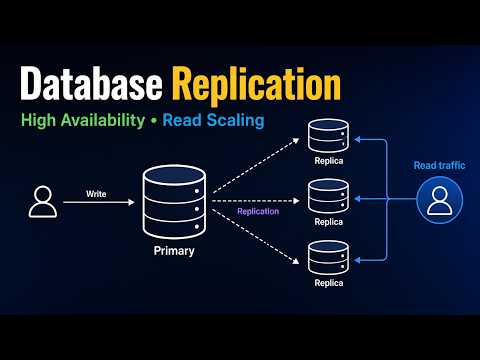
A read replica is a read-only copy of your primary database, kept in sync by replication. Writes go to the primary and reads are spread over the replicas. Most apps read far more than they write, so this takes most of the load off the primary.
Postgres streaming replication is asynchronous by default, so replicas run slightly behind. That gives you the classic bug: a user changes their name, the next page reads from a replica, and the old name shows up. As this PostgreSQL read-replica guide explains, one fix is to send that user's reads to the primary for a few seconds after a write:
// 4. DB struggling → writes to primary, reads to replicas, with a read-your-writes window.
type Db = { name: string; query: (sql: string) => Promise<string> };
const recentWriters = new Map<string, number>();   // userId → time of last write
const STICKY_MS = 5_000;                           // longer than your usual replication lag

export function pickDb(primary: Db, replicas: Db[], userId: string, isWrite: boolean): Db {
  if (isWrite) {
    recentWriters.set(userId, Date.now());
    return primary;
  }
  const wroteAt = recentWriters.get(userId) ?? 0;
  if (Date.now() - wroteAt < STICKY_MS) return primary;        // just wrote → read fresh data
  return replicas[Math.floor(Math.random() * replicas.length)] ?? primary;
}
Tested offline: user u1 read from replica1, then wrote (primary), and the next read stayed on primary because it fell inside the 5-second window.
Where people get this wrong:
- Not watching replication lag. Check
pg_stat_replicationon the primary and alert when it grows. - Expecting replicas to fix write load. They don't. For that you want queues (line 2), batching, or eventually partitioning.
- Skipping the boring fix. A missing index makes a database "struggle" more often than traffic does.
EXPLAIN ANALYZEis cheaper than a replica.
Where the story breaks: Raju copies by hand every few minutes. Real replicas stream changes continuously, usually milliseconds behind, sometimes seconds under heavy load.
Watch: a walkthrough of replication for high availability and read scaling, by Bikki Mahato.
5. Files → object storage + CDN
Tea leaves, cups and sugar used to sit in a pile behind the counter. Now Raju needs thousands of cups, they don't fit, and digging for them slows everyone down. So the big stock goes to a warehouse across town, and small storerooms next to each counter keep the cups people grab most. Nobody crosses town for a cup.
Uploads skip your server. Downloads come from the nearest storeroom.
Don't keep uploads, images or videos on your app server's disk, and don't stream them through your app. Put them in object storage (S3, Cloudflare R2, Backblaze B2, or something self-hosted) and put a CDN in front, so copies are cached close to users.
For uploads, your server signs a short-lived URL and the browser uploads straight to the bucket, so your server never carries the bytes. For serving, give each file a unique name (banner.8f3a1c.webp) and cache it forever:
app.get("/assets/:file", async (c) => {
  const obj = await bucket.get(c.req.param("file"));
  if (!obj) return c.notFound();
  return new Response(obj.body, {
    headers: {
      "Content-Type": obj.contentType,
      "Cache-Control": "public, max-age=31536000, immutable", // file names change when content changes
    },
  });
});
Where people get this wrong:
- Ignoring egress. Storing files is cheap. Downloading them isn't, on some providers. R2 has no egress fee, and B2 is free behind partner CDNs, so compare before you pick.
- Uploading full-size images. Every byte you don't store is a byte you never serve, which is the same lesson as why websites are slow.
- Public buckets for private files. Invoices and user documents get signed URLs with a short expiry.
Watch: Gaurav Sen on what a CDN does, with a TL;DR at the end.

6. Everything breaks → retries, timeouts, logs
One morning the milkman doesn't show up. Raju used to just wait, and the whole stall stopped. Now he has three rules. If the milk isn't here in 10 minutes, stop waiting. Call the second milkman, and if he doesn't pick up, wait a bit before trying again (and don't have all three helpers ring him at the same second). Write down what happened, so at night he can read the logbook and notice the first milkman is late every Tuesday.
Every call has a deadline, a limited number of jittered retries, and a log line.
Real systems fail in pieces: a dependency gets slow, a network call hangs, a third-party API returns 503. You need three habits so one slow part doesn't take the rest down with it.
- A timeout on every outbound call. A request with no deadline can hold a connection, and a user, forever.
- Retries with exponential backoff and jitter, only for failures that might go away. Wait longer after each failure, and randomise the wait so clients don't all retry together. In AWS's Exponential Backoff and Jitter simulation, adding jitter cut total calls by more than half. Marc Brooker's follow-up adds the catch: backoff helps with short spikes, but under long overload only sending less traffic helps, which is why you cap retries.
- Structured logs (JSON with a level, a message and context), so you can search "every time
milkmanfailed this week" instead of scrolling through text.
// 6. Everything breaks → timeouts, retries with full jitter, structured logs.
export const log = (level: string, msg: string, extra: Record<string, unknown> = {}) =>
  console.log(JSON.stringify({ ts: new Date().toISOString(), level, msg, ...extra }));

const sleep = (ms: number) => new Promise((r) => setTimeout(r, ms));

export async function withRetry<T>(
  name: string,
  fn: (signal: AbortSignal) => Promise<T>,
  { attempts = 4, timeoutMs = 2_000, baseMs = 100, capMs = 2_000 } = {},
): Promise<T> {
  for (let i = 1; ; i++) {
    try {
      return await fn(AbortSignal.timeout(timeoutMs));         // every call gets a deadline
    } catch (err) {
      if (i >= attempts) {
        log("error", `${name} failed`, { attempts: i, error: String(err) });
        throw err;
      }
      const wait = Math.random() * Math.min(capMs, baseMs * 2 ** i); // full jitter
      log("warn", `${name} retrying`, { attempt: i, waitMs: Math.round(wait) });
      await sleep(wait);
    }
  }
}
Wrap anything that touches the network:
const menu = await withRetry("menu-api", (signal) =>
  fetch("https://api.example.com/menu", { signal }).then((r) => {
    if (!r.ok) throw new Error(`HTTP ${r.status}`);
    return r.json();
  }),
);
Tested offline:
- A call that failed twice ("no milk") worked on the third try, with two
warnlines showing jittered waits of 13 ms and 18 ms. - A call that hung forever got cut off by a 50 ms timeout, retried once, then gave up with a
TimeoutErrorand anerrorline.
Where people get this wrong:
- Retrying things that aren't safe to retry. GETs are fine, and so are writes with an idempotency key. Retrying "charge the card" without one can charge twice.
- Retrying at every layer. If the browser, the API and the worker each retry 3 times, one failure becomes 27 calls. Pick one layer.
- Logs without a request ID. Pass one through every service so you can follow a single request end to end. OpenTelemetry (Apache-2.0) is the standard for traces as well as logs.
Scrapers need this more than anything, because they call flaky sites all day. The retry wrapper above drops straight into the one-file Hono scraping API.
Watch: a longer deep dive on retries and exponential backoff from glich.stream (about 30 minutes, with chapters).

Raju's stall at the end of the week
Timeouts, retries and logs aren't a box in this diagram. They're on every arrow.
Don't add all six on day one
Raju didn't build a warehouse before he had customers, and you shouldn't either. This is the order I'd go in:
- Logs and timeouts first. They cost nothing and make every later problem visible.
- Object storage and a CDN for files, from day one. Moving files off a server later is painful.
- A cache once the same read keeps showing up in your slow-query log.
- A queue when a request makes the user wait for something they don't need to wait for.
- A load balancer when one server's CPU or memory is regularly maxed out. On Vercel or Cloudflare it's already there.
- Read replicas last, after indexes, caching and query fixes. They add lag, cost and moving parts.
If you want to see what this setup would cost before you build it, StackBudget, my open-source calculator, scans a repo and prices its services at launch, growth and scale.
Things people believe that aren't true
- "A cache makes my app faster." Only for reads that repeat. A cache with a 5% hit rate makes things slower and adds a stale-data bug.
- "A queue makes the work faster." It makes the response faster. The work takes just as long, it just happens later.
- "More servers fix slowness." Not when the database is the bottleneck. You've just added more clients fighting over it.
- "Replicas are backups." Drop a table on the primary and the replicas drop it too, within milliseconds. Take real backups.
- "Retry until it works." Unlimited retries turn a small outage into a big one.
Try it in five minutes
Copy withRetry from section 6 into any Node project and wrap one fetch call to a third-party API. Turn your Wi-Fi off for ten seconds and watch the JSON logs: a couple of warnings and a success when the connection comes back, or one clean error instead of a hung request.
Quick quiz
- Your product page shows the same price to 10,000 people a minute and the database is at 90% CPU. Which line do you reach for first?
- Signup takes 4 seconds because it sends a welcome email and creates a Stripe customer. Which line?
- A user changes their name and the next page sometimes shows the old one. What's the likely cause?
- Why do retries need jitter?
- Why does a load balancer force sessions out of server memory?
Answers:
- A cache.
- A queue. Return straight away and send the email from a worker.
- Replication lag on a read replica. Send that user's reads to the primary for a few seconds after a write.
- So clients don't all retry at the same moment and knock the service over again.
- The next request may land on a different server that doesn't have the session.