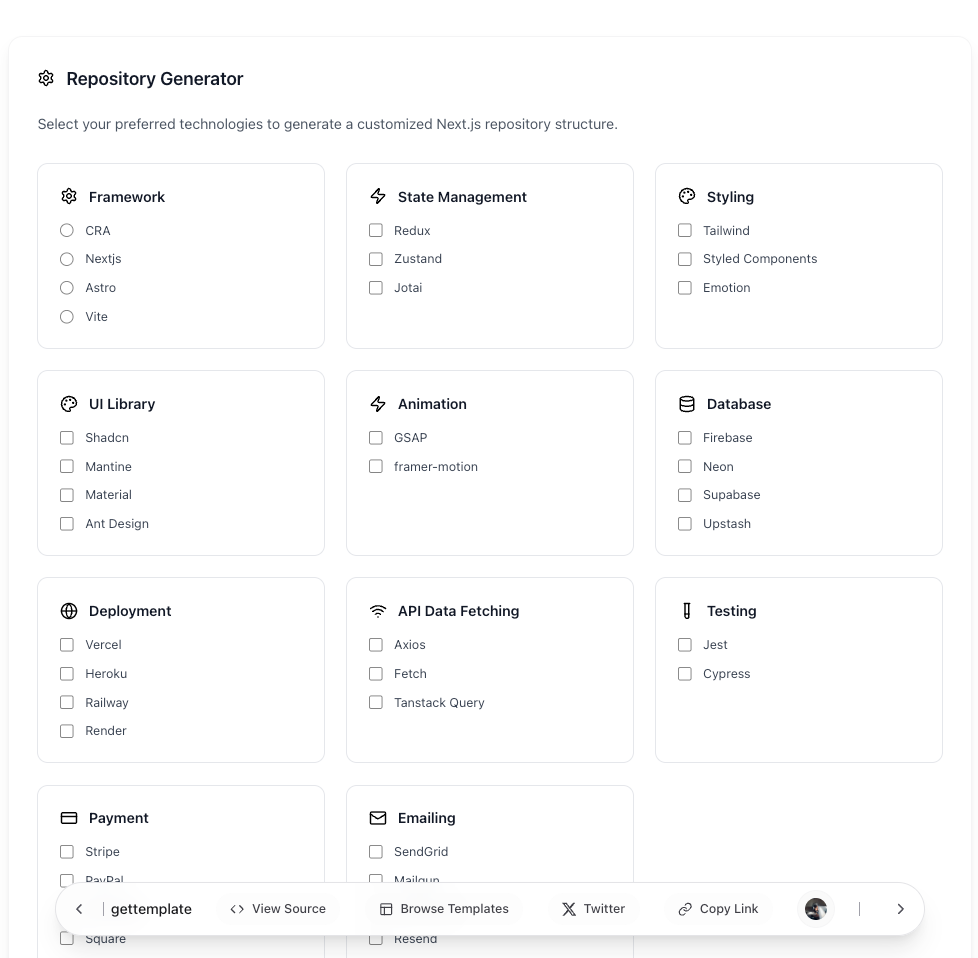
Hello and welcome to new blog
In this story, we will be building a frontend nextjs automation script along with the nextjs repository code generator.
I got this idea while working on iHateReading, writing and sharing a new blog code repository or sample repository. I've to follow the same steps as defined below
- Generate a new code repository
- Install the packages
- Add a file/folder as per the requirements
- Add env keys
Same repetitive process, so one good idea is to automate it and while automating, we share the journey of how we have built the automation tool.
Frontend Automation
Frontend automation does need an API to finally create the repository. But one can use an AI LLM model to generate a repository, or one can manually provide instructions to generate a repository of your choice of structure.
2 ways to generate a repository
- Create a repository using AI LLM
- Generate a repository programmatically using the JS fs module
The latter process is not complicated, in fact provides more control but needs a lot of maintenance and regular updates.
We will be using Vercel AI SDK in the frontend nextjs repository to create the repository using AI LLM, and in UI components, a simple form with a few options for the user to select and customise the repository will be created.
import React, { useState } from "react";
import {
	Folder,
	File,
	ChevronRight,
	ChevronDown,
	CheckCircle,
	Download,
	Settings,
	Palette,
	Zap,
	Database,
	Globe,
	Wifi,
	TestTube,
	CreditCard,
	Mail,
} from "lucide-react";

const RepositoryGeneratorForm = () => {
	const [formData, setFormData] = useState({
		framework: "",
		stateManagement: [],
		styling: [],
		uiLibrary: [],
		animation: [],
		database: [],
		deployment: [],
		apiDataFetching: [],
		testing: [],
		payment: [],
		emailing: [],
	});

	const [instructions, setInstructions] = useState("");

	const [isSubmitted, setIsSubmitted] = useState(false);
	const [showFileTree, setShowFileTree] = useState(false);
	const [expandedFolders, setExpandedFolders] = useState(
		new Set(["app", "components", "lib", "public"])
	);
	const [selectedFile, setSelectedFile] = useState(null);

	const categories = {
		framework: {
			label: "Framework",
			icon: Settings,
			options: ["CRA", "Nextjs", "Astro", "Vite"],
			type: "radio",
		},
		stateManagement: {
			label: "State Management",
			icon: Zap,
			options: ["Redux", "Zustand", "Jotai"],
			type: "checkbox",
		},
		styling: {
			label: "Styling",
			icon: Palette,
			options: ["Tailwind", "Styled Components", "Emotion"],
			type: "checkbox",
		},
		uiLibrary: {
			label: "UI Library",
			icon: Palette,
			options: ["Shadcn", "Mantine", "Material", "Ant Design"],
			type: "checkbox",
		},
		animation: {
			label: "Animation",
			icon: Zap,
			options: ["GSAP", "framer-motion"],
			type: "checkbox",
		},
		database: {
			label: "Database",
			icon: Database,
			options: ["Firebase", "Neon", "Supabase", "Upstash"],
			type: "checkbox",
		},
		deployment: {
			label: "Deployment",
			icon: Globe,
			options: ["Vercel", "Heroku", "Railway", "Render"],
			type: "checkbox",
		},
		apiDataFetching: {
			label: "API Data Fetching",
			icon: Wifi,
			options: ["Axios", "Fetch", "Tanstack Query"],
			type: "checkbox",
		},
		testing: {
			label: "Testing",
			icon: TestTube,
			options: ["Jest", "Cypress"],
			type: "checkbox",
		},
		payment: {
			label: "Payment",
			icon: CreditCard,
			options: ["Stripe", "PayPal", "Razorpay", "Square"],
			type: "checkbox",
		},
		emailing: {
			label: "Emailing",
			icon: Mail,
			options: ["SendGrid", "Mailgun", "Nodemailer", "Resend"],
			type: "checkbox",
		},
	};

	const handleInputChange = (category, option, type) => {
		if (type === "radio") {
			setFormData((prev) => ({
				...prev,
				[category]: option,
			}));
		} else {
			setFormData((prev) => ({
				...prev,
				[category]: prev[category].includes(option)
					? prev[category].filter((item) => item !== option)
					: [...prev[category], option],
			}));
		}
	};

	const handleSubmit = (e) => {
		e.preventDefault();
		setIsSubmitted(true);
		setShowFileTree(true);
		console.log("Repository configuration:", formData);
		console.log("Instructions:", instructions);
	};

	const toggleFolder = (folderName) => {
		setExpandedFolders((prev) => {
			const newSet = new Set(prev);
			if (newSet.has(folderName)) {
				newSet.delete(folderName);
			} else {
				newSet.add(folderName);
			}
			return newSet;
		});
	};

	const generateFileContent = (fileName) => {
		const contents = {
			"layout.jsx": `import { Inter } from 'next/font/google'
import './globals.css'

const inter = Inter({ subsets: ['latin'] })

export const metadata = {
  title: 'My Next.js App',
  description: 'Generated with Repository Generator',
}

export default function RootLayout({ children }) {
  return (
    <html lang="en">
      <body className={inter.className}>{children}</body>
    </html>
  )
}`,
			"page.jsx": `export default function Home() {
  return (
    <main className="min-h-screen p-8">
      <h1 className="text-4xl font-bold mb-4">
        Welcome to My Next.js App
      </h1>
      <p className="text-lg text-gray-600">
        This project was generated with the Repository Generator.
      </p>
    </main>
  )
}`,
			"globals.css": `@tailwind base;
@tailwind components;
@tailwind utilities;

:root {
  --foreground-rgb: 0, 0, 0;
  --background-start-rgb: 214, 219, 220;
  --background-end-rgb: 255, 255, 255;
}

@media (prefers-color-scheme: dark) {
  :root {
    --foreground-rgb: 255, 255, 255;
    --background-start-rgb: 0, 0, 0;
    --background-end-rgb: 0, 0, 0;
  }
}

body {
  color: rgb(var(--foreground-rgb));
  background: linear-gradient(
    to bottom,
    transparent,
    rgb(var(--background-end-rgb))
  )
  rgb(var(--background-start-rgb));
}`,
			"utils.js": `// Utility functions for the application

export const formatDate = (date) => {
  return new Date(date).toLocaleDateString();
};

export const capitalize = (str) => {
  return str.charAt(0).toUpperCase() + str.slice(1);
};

export const debounce = (func, wait) => {
  let timeout;
  return function executedFunction(...args) {
    const later = () => {
      clearTimeout(timeout);
      func(...args);
    };
    clearTimeout(timeout);
    timeout = setTimeout(later, wait);
  };
};`,
			"constants.js": `// Application constants

export const APP_NAME = 'My Next.js App';
export const APP_VERSION = '1.0.0';

export const API_ENDPOINTS = {
  USERS: '/api/users',
  POSTS: '/api/posts',
  COMMENTS: '/api/comments',
};

export const THEME_COLORS = {
  primary: '#000000',
  secondary: '#6b7280',
  accent: '#3b82f6',
};`,
			"package.json": JSON.stringify(
				{
					name: "my-nextjs-app",
					version: "0.1.0",
					private: true,
					scripts: {
						dev: "next dev",
						build: "next build",
						start: "next start",
						lint: "next lint",
					},
					dependencies: {
						next: "14.1.0",
						react: "^18.2.0",
						"react-dom": "^18.2.0",
						"framer-motion": "^11.0.8",
						"lucide-react": "^0.344.0",
					},
					devDependencies: {
						autoprefixer: "^10.4.18",
						postcss: "^8.4.35",
						tailwindcss: "^3.4.1",
					},
				},
				null,
				2
			),
			"tailwind.config.js": `/** @type {import('tailwindcss').Config} */
module.exports = {
  content: [
    "./app/**/*.{js,ts,jsx,tsx,mdx}",
  ],
  theme: {
    extend: {},
  },
  plugins: [],
}`,
			"next.config.js": `/** @type {import('next').NextConfig} */
const nextConfig = {
  reactStrictMode: true,
  swcMinify: true,
}

module.exports = nextConfig`,
			"postcss.config.js": `module.exports = {
  plugins: {
    tailwindcss: {},
    autoprefixer: {},
  },
}`,
			"README.md": `# My Next.js App

A modern Next.js application generated with the Repository Generator.
Features
- Modern UI with Tailwind CSS
- Responsive design
- Dark mode support
- Built with Next.js 14
Getting Started
-
Install dependencies: ```bash npm install ```
-
Run the development server: ```bash npm run dev ```
-
Open http://localhost:3000 in your browser.
Technologies Used
- Next.js 14
- Tailwind CSS
- Framer Motion
- Lucide Icons
, "firebase.config.js":// Firebase configuration import { initializeApp } from 'firebase/app'; import { getAuth } from 'firebase/auth'; import { getFirestore } from 'firebase/firestore';
const firebaseConfig = { apiKey: process.env.NEXT_PUBLIC_FIREBASE_API_KEY, authDomain: process.env.NEXT_PUBLIC_FIREBASE_AUTH_DOMAIN, projectId: process.env.NEXT_PUBLIC_FIREBASE_PROJECT_ID, storageBucket: process.env.NEXT_PUBLIC_FIREBASE_STORAGE_BUCKET, messagingSenderId: process.env.NEXT_PUBLIC_FIREBASE_MESSAGING_SENDER_ID, appId: process.env.NEXT_PUBLIC_FIREBASE_APP_ID };
const app = initializeApp(firebaseConfig);
export const auth = getAuth(app);
export const db = getFirestore(app);, "jest.config.js": const nextJest = require('next/jest')
const createJestConfig = nextJest({ // Provide the path to your Next.js app to load next.config.js and .env files dir: './', })
// Add any custom config to be passed to Jest
const customJestConfig = {
setupFilesAfterEnv: ['
// createJestConfig is exported this way to ensure that next/jest can load the Next.js config which is async module.exports = createJestConfig(customJestConfig)`, };
	return (
		contents[fileName] || `// ${fileName}\n// File content not available`
	);
};

const generateFileTree = () => {
	const tree = [
		{
			name: "app",
			type: "folder",
			children: [
				{ name: "layout.jsx", type: "file" },
				{ name: "page.jsx", type: "file" },
				{ name: "globals.css", type: "file" },
				{
					name: "components",
					type: "folder",
					children: [
						{ name: "ui", type: "folder", children: [] },
						{ name: "forms", type: "folder", children: [] },
						{ name: "layout", type: "folder", children: [] },
					],
				},
				{
					name: "lib",
					type: "folder",
					children: [
						{ name: "utils.js", type: "file" },
						{ name: "constants.js", type: "file" },
					],
				},
			],
		},
		{
			name: "public",
			type: "folder",
			children: [
				{ name: "favicon.ico", type: "file" },
				{ name: "logo.svg", type: "file" },
			],
		},
		{ name: "package.json", type: "file" },
		{ name: "tailwind.config.js", type: "file" },
		{ name: "next.config.js", type: "file" },
		{ name: "postcss.config.js", type: "file" },
		{ name: "README.md", type: "file" },
	];

	// Add selected dependencies to package.json
	if (formData.database.includes("Firebase")) {
		tree.push({ name: "firebase.config.js", type: "file" });
	}
	if (formData.stateManagement.includes("Redux")) {
		tree.push({ name: "redux", type: "folder", children: [] });
	}
	if (formData.testing.includes("Jest")) {
		tree.push({ name: "jest.config.js", type: "file" });
	}

	return tree;
};

const renderFileTree = (items, level = 0) => {
	return items.map((item, index) => {
		const isExpanded = expandedFolders.has(item.name);
		const hasChildren = item.children && item.children.length > 0;

		return (
			<div key={index} style={{ marginLeft: `${level * 20}px` }}>
				<div className="flex items-center py-1 hover:bg-gray-50 rounded px-2">
					{hasChildren ? (
						<button
							onClick={() => toggleFolder(item.name)}
							className="mr-2 text-gray-500 hover:text-gray-700"
						>
							{isExpanded ? (
								<ChevronDown className="w-4 h-4" />
							) : (
								<ChevronRight className="w-4 h-4" />
							)}
						</button>
					) : (
						<div className="w-6 mr-2" />
					)}

					{item.type === "folder" ? (
						<Folder className="w-4 h-4 text-zinc-500 mr-2" />
					) : (
						<File className="w-4 h-4 text-gray-500 mr-2" />
					)}

					<span
						className={`text-sm font-mono ${
							item.type === "file" ? "cursor-pointer hover:text-zinc-600" : ""
						}`}
						onClick={() => item.type === "file" && setSelectedFile(item.name)}
					>
						{item.name}
					</span>
				</div>

				{hasChildren && isExpanded && (
					<div>{renderFileTree(item.children, level + 1)}</div>
				)}
			</div>
		);
	});
};

const downloadRepository = () => {
	// This would integrate with the existing repository generation logic
	console.log("Downloading repository with configuration:", formData);
	// You can integrate this with the existing useGenerateNextjsRepository hook
};

if (isSubmitted && showFileTree) {
	return (
		<div className="p-10 max-w-6xl mx-auto">
			<div className="bg-white rounded-2xl shadow-lg border border-zinc-100">
				<div className="p-6 md:p-8">
					<div className="flex items-center gap-3 mb-6">
						<CheckCircle className="w-5 h-5 text-zinc-500" />
						<h2 className="text-xl font-semibold text-gray-900">
							Repository Generated Successfully!
						</h2>
					</div>

					<div className="mb-6">
						<h3 className="text-lg font-medium text-gray-900 mb-4">
							Selected Technologies:
						</h3>
						<div className="grid grid-cols-2 md:grid-cols-3 gap-4">
							{Object.entries(formData).map(([category, options]) => {
								const hasSelection =
									category === "framework"
										? options !== ""
										: Array.isArray(options) && options.length > 0;

								return (
									hasSelection && (
										<div key={category} className="bg-gray-50 p-3 rounded-xl">
											<h4 className="font-medium text-gray-900 mb-2">
												{categories[category].label}
											</h4>
											<div className="flex flex-wrap gap-1">
												{category === "framework" ? (
													<span className="bg-zinc-100 text-zinc-800 text-xs px-2 py-1 rounded">
														{options}
													</span>
												) : (
													options.map((option) => (
														<span
															key={option}
															className="bg-zinc-100 text-zinc-800 text-xs px-2 py-1 rounded"
														>
															{option}
														</span>
													))
												)}
											</div>
										</div>
									)
								);
							})}
						</div>
					</div>

					{instructions && (
						<div className="mb-6">
							<h3 className="text-lg font-medium text-gray-900 mb-4">
								Additional Instructions:
							</h3>
							<div className="bg-gray-50 p-4 rounded-xl">
								<p className="text-gray-700">{instructions}</p>
							</div>
						</div>
					)}

					<div className="mb-6">
						<h3 className="text-lg font-medium text-gray-900 mb-4">
							Project Structure:
						</h3>
						<div className="grid grid-cols-1 lg:grid-cols-2 gap-6">
							<div className="bg-gray-900 text-zinc-400 p-4 rounded-xl font-mono text-sm overflow-x-auto max-h-96 overflow-y-auto">
								{renderFileTree(generateFileTree())}
							</div>

							{selectedFile && (
								<div className="bg-gray-900 text-zinc-400 p-4 rounded-xl font-mono text-sm overflow-x-auto max-h-96 overflow-y-auto">
									<div className="flex items-center justify-between mb-4 pb-2 border-b border-gray-700">
										<h4 className="text-white font-medium">{selectedFile}</h4>
										<button
											onClick={() => setSelectedFile(null)}
											className="text-gray-400 hover:text-white"
										>
											×
										</button>
									</div>
									<pre className="whitespace-pre-wrap">
										{generateFileContent(selectedFile)}
									</pre>
								</div>
							)}
						</div>
					</div>

					<div className="flex gap-4">
						<button
							onClick={downloadRepository}
							className="flex items-center gap-2 bg-black text-white px-6 py-3 rounded-xl font-medium hover:bg-gray-800 transition-colors"
						>
							<Download className="w-4 h-4" />
							Download Repository
						</button>
						<button
							onClick={() => {
								setIsSubmitted(false);
								setShowFileTree(false);
								setSelectedFile(null);
								setFormData({
									framework: "",
									stateManagement: [],
									styling: [],
									uiLibrary: [],
									animation: [],
									database: [],
									deployment: [],
									apiDataFetching: [],
									testing: [],
									payment: [],
									emailing: [],
								});
								setInstructions("");
							}}
							className="border border-gray-300 text-gray-700 px-6 py-3 rounded-xl font-medium hover:bg-gray-50 transition-colors"
						>
							Create New Repository
						</button>
					</div>
				</div>
			</div>
		</div>
	);
}

return (
	<div className="p-10 max-w-6xl mx-auto">
		<form
			onSubmit={handleSubmit}
			className="space-y-6 border border-zinc-100 rounded-2xl shadow-lg"
		>
			<div className="p-6 md:p-8">
				<div className="flex items-center gap-3 mb-6">
					<Settings className="w-5 h-5 text-black" />
					<h2 className="text-xl font-semibold text-gray-900">
						Repository Generator
					</h2>
				</div>

				<p className="text-gray-600 mb-8">
					Select your preferred technologies to generate a customized Next.js
					repository structure.
				</p>

				<div className="grid grid-cols-1 md:grid-cols-2 lg:grid-cols-3 gap-6">
					{Object.entries(categories).map(([categoryKey, category]) => {
						const IconComponent = category.icon;
						return (
							<div
								key={categoryKey}
								className="border border-gray-200 rounded-xl p-6"
							>
								<div className="flex items-center gap-3 mb-4">
									<IconComponent className="w-5 h-5 text-black" />
									<h3 className="font-semibold text-gray-900">
										{category.label}
									</h3>
								</div>

								<div className="space-y-3">
									{category.options.map((option) => (
										<label
											key={option}
											className="flex items-center gap-3 cursor-pointer"
										>
											<input
												type={category.type}
												name={categoryKey}
												value={option}
												checked={
													category.type === "radio"
														? formData[categoryKey] === option
														: formData[categoryKey].includes(option)
												}
												onChange={() =>
													handleInputChange(
														categoryKey,
														option,
														category.type
													)
												}
												className={`w-4 h-4 text-zinc-600 border-zinc-300 focus:ring-zinc-500 focus:ring-2 ${
													category.type === "radio"
														? "rounded-full"
														: "rounded"
												}`}
											/>
											<span className="text-sm text-gray-700">{option}</span>
										</label>
									))}
								</div>
							</div>
						);
					})}
				</div>

				<div className="mt-8 pt-6 border-t border-gray-200">
					<label className="block text-sm font-medium text-gray-700 mb-2">
						Additional Instructions
					</label>
					<textarea
						value={instructions}
						onChange={(e) => setInstructions(e.target.value)}
						rows={4}
						className="w-full px-4 py-3 border border-gray-300 rounded-xl focus:ring-2 focus:ring-black focus:outline-none outline-none focus:border-transparent transition-colors resize-none"
						placeholder="Provide any additional instructions or requirements for your repository..."
					/>
				</div>

				<div className="mt-8 pt-6 border-t border-gray-200">
					<button
						type="submit"
						className="w-full bg-black text-white py-4 rounded-xl font-medium hover:bg-gray-800 transition-colors"
					>
						Generate Repository
					</button>
				</div>
			</div>
		</form>
	</div>
);
};
export default RepositoryGeneratorForm;
I've started another product, <a href="http://gettemplate.website">gettemplate.website</a>, that provides the code samples in React, HTML and Nextjs to help developers build quickly on the go by simply copying and pasting or even downloading the repository.

<a href="https://www.gettemplate.website/template/repository-generator-form" target="_blank" rel="external">Frontend repository generator form</a>
Backend Automation
This is also quite easy using AI LLM; one API endpoint might work well for a simple automation task. I'll be using Node with an Express app and Ollama to run a local LLM model and then use that to generate a code repository.
If you are new to running Ollama LLM models locally, read this blog.
Below is the endpoint. I'll explain one by one
import { GoogleGenAI } from "@google/genai";

const googleGenAIClient = new GoogleGenAI({
	model: "gemini-1.5-flash",
	apiKey: process.env.GOOGLE_GENAI_API_KEY,
});

export const generateCustomRepo = async (req, res) => {
	try {
		const { projectName, ...dependencyGraph } = req.body;
		res.setHeader("Content-Type", "text/event-stream");
		res.setHeader("Cache-Control", "no-cache");
		res.setHeader("Connection", "keep-alive");

		const sendEvent = (message) => {
			res.write(`data: ${JSON.stringify({ message })}\n\n`);
		};

		console.log("Initializing repository generation...");

		const systemPrompt = getCustomRepoGeneratorSystemPrompt(dependencyGraph);
		const messages = [
			new SystemMessage(systemPrompt),
			new HumanMessage(
				`Generate the code repository structure for the dependency graph: ${JSON.stringify(
					dependencyGraph,
					null,
					2
				)}`
			),
		];
		let gptResponse = "";
		let inputTokens = 0;
		let outputTokens = 0;

		try {
			const response = await googleGenAIClient.chats.create({
				model: "gemini-1.5-flash",
				messages: messages,
			});
			gptResponse = response.response.text();
			sendEvent(gptResponse);
			console.log(gptResponse, "gptResponse");
			console.log("Repository generated successfully.");

			// Calculate input tokens from the messages
			inputTokens = await Promise.all(
				messages.map((msg) => googleClient.getNumTokens(msg.content))
			).then((tokens) => tokens.reduce((total, num) => total + num, 0));

			// Calculate output tokens from the complete response
			outputTokens = await googleClient.getNumTokens(gptResponse);

			console.log(
				`Input tokens: ${inputTokens}, Output tokens: ${outputTokens}`
			);

			// End the response stream
			res.end();
		} catch (validationError) {
			console.error("Error in generating custom repo:", validationError);
			res.end();
		}
	} catch (error) {
		console.error("Error in generating custom repo:", error);
		res.write(
			`data: ${JSON.stringify({
				error: "Error in generating custom repo",
			})}\n\n`
		);
		res.end();
	}
};
First, we install the package, @google/genai, one can use openai as well as langchain with other LLM providers.
Secondly, we provide system prompts by taking the package dependencies such as framework, state management, libraries, payment, emailing, testing, styling and database.
Categories
- Framework
- Styling
- UI libraries
- State Management
- Payments
- Emailing
- Testing
- Database
- API
Third, we define the system prompt for the AI LLM model, instructing the LLM model with detailed instructions about how to install packages, and add the required file/folder, updating package.json, final output format, handling errors and edge cases.
System prompt is the most important thing in AI LLM apps, so carefully and with detail adjust the prompt to make sure the results are accurate.
Our system prompts with a dependency graph
export const getCustomRepoGeneratorSystemPrompt = (dependencyGraph) => `
You are a professional Next.js developer. Generate a complete, ready-to-run Next.js project structure based on the provided dependencyGraph. Focus on creating a minimal but functional setup that developers can start coding with immediately.

IMPORTANT: Return ONLY raw JSON structure without markdown, code blocks, or backticks. Escape all special characters to ensure valid JSON.

Core Requirements:
1. Use Next.js 14 with App Router as the default framework
2. Include only essential files to get started quickly
3. Use latest stable package versions
4. Maximum directory depth: 2 levels
5. Include basic configuration files for all specified dependencies

### Essential Files (Always Include):
- package.json: Core dependencies + scripts
- next.config.js: Basic Next.js configuration
- .gitignore: Standard Next.js gitignore
- README.md: Basic project setup instructions
- .env.example: Environment variable placeholders
- app/layout.tsx: Root layout component
- app/page.tsx: Home page component

### Next.js App Router Structure:
- app/ directory with:
  - layout.tsx: Root layout with metadata
  - page.tsx: Home page with basic content
  - globals.css: Global styles
  - favicon.ico: Basic favicon

### Styling Integration:
- tailwindcss: tailwind.config.js + postcss.config.js + globals.css setup
- css-modules: styles/ directory with .module.css files
- styled-components: theme/ directory with theme configuration

### UI Libraries:
- shadcn/ui: components/ui/ directory + tailwind setup
- mui: components/mui/ directory + theme provider
- antd: components/ant/ directory + basic setup
- chakra-ui: components/chakra/ directory + provider setup

### State Management:
- redux: store/ directory with Redux Toolkit setup
- zustand: store/ directory with basic store
- jotai: store/atoms/ directory with sample atoms

### Backend Services:
- firebase: config/firebase.js + services/firebase/ directory
- supabase: config/supabase.js + services/supabase/ directory
- appwrite: config/appwrite.js + services/appwrite/ directory

### CMS Integration:
- sanity: studio/ directory + schemas/ directory
- contentful: services/contentful/ directory
- strapi: services/strapi/ directory

### Authentication:
- firebase: auth/ directory with Firebase Auth setup
- supabase: auth/ directory with Supabase Auth setup
- appwrite: auth/ directory with Appwrite Auth setup

### Payment Integration:
- stripe: services/stripe/ directory + API routes
- paypal: services/paypal/ directory + API routes

### Testing & Linting:
- jest: __tests__/ directory + jest.config.js
- vitest: tests/ directory + vitest.config.js
- eslint: .eslintrc.js + .eslintignore
- prettier: .prettierrc + .prettierignore

### Deployment:
- vercel: vercel.json configuration
- netlify: netlify.toml configuration

### Analytics & Monitoring:
- google-analytics: services/analytics/ directory
- sentry: sentry.client.config.js + sentry.server.config.js

### Email Services:
- resend: services/email/ directory + API routes
- sendgrid: services/email/ directory + API routes

### SEO:
- next-seo: next-seo.config.js + metadata setup in layout.tsx

Output Format:
{
  "name": "\${dependencyGraph.projectName || 'nextjs-project'}",
  "type": "directory",
  "children": [
    {
      "name": "package.json",
      "type": "file",
      "content": "{\"name\": \"project-name\", \"scripts\": {...}, \"dependencies\": {...}}"
    },
    {
      "name": "app",
      "type": "directory",
      "children": [...]
    }
  ]
}

Validation Rules:
1. Pure JSON output - no markdown or code blocks
2. All file contents must be valid strings (escape quotes)
3. Include only specified dependencies from dependencyGraph
4. Each file should have minimal but functional code
5. Configuration files should follow official documentation
6. Environment variables should be in .env.example only

Generate a clean, production-ready Next.js project structure that developers can immediately run with "npm install && npm run dev".
`;
Dependency graph using Zod for schema definition
import { z } from "zod":

export const dependencyGraphSchema = z.object({
	projectname: z.string().optional(),
	frameworks: z.enum([
		"next.js",
		"create-react-app",
		"vite.js",
		"remix",
		"other",
	]),
	styling: z.enum(["tailwindcss", "css-modules", "styled-components"]),
	database: z.enum(["firebase", "supabase", "appwrite"]).optional(),
	ui: z
		.enum(["shadcn/ui", "mui", "antd", "mantine", "chakra-ui", "other"])
		.optional(),
	cms: z
		.enum(["sanity", "contentful", "directus", "strapi", "wordpress", "other"])
		.optional(),
	payment: z
		.enum(["stripe", "paypal", "lemonsqueezy", "razorpay", "other"])
		.optional(),
	emailing: z.enum(["resend", "sendgrid", "mailgun", "other"]).optional(),
	statemanagement: z
		.enum(["redux", "zustand", "jotai", "mobx", "xstate"])
		.optional(),
	routing: z.enum(["next.js", "react-router", "react-router-dom"]).optional(),
	testing: z.enum(["jest", "vitest", "cypress"]).optional(),
	linting: z.enum(["eslint", "prettier"]).optional(),
	deployment: z
		.enum([
			"vercel",
			"netlify",
			"heroku",
			"railway",
			"aws",
			"bun",
			"bun.sh",
			"other",
		])
		.optional(),
	authentication: z.enum(["firebase", "supabase", "appwrite"]).optional(),
	api: z.enum(["firebase", "supabase", "appwrite"]).optional(),
	other: z.string().optional(),
	monitoring: z.enum(["sentry", "logrocket", "other"]).optional(),
	analytics: z
		.enum([
			"google-analytics",
			"mixpanel",
			"other",
			"amplitude",
			"posthog",
			"plausible",
		])
		.optional(),
	seo: z
		.enum(["next-seo", "react-helmet", "other", "vercel-analytics"])
		.optional(),
	sms: z.enum(["twilio", "other"]).optional(),
});
Fourth and last one, add the system prompt and user prompt to the LLM instance to invoke chat and wait for the AI to finish creating the repository structure.
Once that is done, our AI will provide the JSON structure as defined in the dependency schema above, which we can directly use in the Frontend or client side to iterate over nested JSON, generating a repository tree.
Vercel AI SDK can be used in nextjs to create a repository using AI by using the same endpoint code we used for backend automation.
import { streamText } from "ai";
import { createGoogleGenerativeAI } from "@ai-sdk/google";

const googleClient = createGoogleGenerativeAI({
	apiKey: process.env.NEXT_PUBLIC_GOOGLE_API_KEY,
});

const generateRepositorySystemPrompt = () => {
	return `You are an expert Next.js developer and repository generator. Your task is to generate a complete Next.js repository structure based on the user's technology selections.

IMPORTANT RULES:
1. Always respond with valid JSON structure
2. Never start with \`\`\` or any markdown formatting
3. The response must be a valid JSON object
4. Include all necessary files for a Next.js project
5. Generate realistic, functional code for each file
6. Consider the selected technologies when generating dependencies and configurations

RESPONSE FORMAT:
{
  "files": [
    {
      "name": "filename.ext",
      "path": "relative/path/to/file",
      "content": "file content here"
    }
  ],
  "packageJson": {
    "dependencies": {},
    "devDependencies": {}
  },
  "description": "Brief description of the generated repository"
}

TECHNOLOGY MAPPINGS:
- Framework: Nextjs, CRA, Astro, Vite
- State Management: Redux, Zustand, Jotai
- Styling: Tailwind, Styled Components, Emotion
- UI Library: Shadcn, Mantine, Material, Ant Design
- Animation: GSAP, framer-motion
- Database: Firebase, Neon, Supabase, Upstash
- Deployment: Vercel, Heroku, Railway, Render
- API Data Fetching: Axios, Fetch, Tanstack Query
- Testing: Jest, Cypress
- Payment: Stripe, PayPal, Razorpay, Square
- Emailing: SendGrid, Mailgun, Nodemailer, Resend

Generate appropriate configurations, dependencies, and code based on the selected technologies.`;
};

export default async function handler(req, res) {
	if (req.method !== "POST") {
		return res.status(405).json({ error: "Method Not Allowed" });
	}

	try {
		const { formData, instructions } = req.body;

		if (!formData) {
			return res.status(400).json({ error: "Form data is required" });
		}

		const prompt = `Generate a Next.js repository with the following technology selections:

Framework: ${formData.framework}
State Management: ${formData.stateManagement.join(", ") || "None"}
Styling: ${formData.styling.join(", ") || "None"}
UI Library: ${formData.uiLibrary.join(", ") || "None"}
Animation: ${formData.animation.join(", ") || "None"}
Database: ${formData.database.join(", ") || "None"}
Deployment: ${formData.deployment.join(", ") || "None"}
API Data Fetching: ${formData.apiDataFetching.join(", ") || "None"}
Testing: ${formData.testing.join(", ") || "None"}
Payment: ${formData.payment.join(", ") || "None"}
Emailing: ${formData.emailing.join(", ") || "None"}

Additional Instructions: ${instructions || "None"}

Please generate a complete Next.js repository structure with all necessary files, configurations, and dependencies based on these selections.`;

		const result = await streamText({
			model: googleClient("gemini-1.5-flash"),
			messages: [
				{
					role: "system",
					content: generateRepositorySystemPrompt(),
				},
				{
					role: "user",
					content: prompt,
				},
			],
			temperature: 0.7,
			streamProtocol: true,
		});

		try {
			for await (const chunk of result.textStream) {
				res.write(chunk);
			}

			try {
				res.end();
			} catch (error) {
				console.error("Error processing response:", error);
				res.status(500).json({
					error: "Invalid JSON response from AI",
					details: error.message,
				});
			}
		} catch (streamError) {
			console.error("Streaming error:", streamError);
			res
				.status(500)
				.json({ error: "Streaming error", details: streamError.message });
		}
	} catch (error) {
		console.error("API Error:", error);
		return res
			.status(500)
			.json({ error: "Internal Server Error", details: error.message });
	}
}
If you are using Vercel AI SDK, read this blog. Yes, iHateReading has a blog for almost all things in software development for website, app, API and mobile app development.
That's it for today, see you in the next one
iHateReading
Summary
This blog post describes building a Next.js frontend and backend automation script for generating code repositories. The frontend, using the Vercel AI SDK (or a similar LLM), allows users to select technologies (framework, styling, database, etc.) via a form, which then generates a customized Next.js project structure. The backend, a Node.js/Express app, utilizes a Google GenAI LLM (or similar) to generate the repository structure based on user-provided technology choices and instructions. Both frontend and backend leverage AI to automate the repetitive process of creating new repositories, reducing manual effort and improving developer workflow. The author also mentions a separate project, gettemplate.website, which provides readily available code samples.