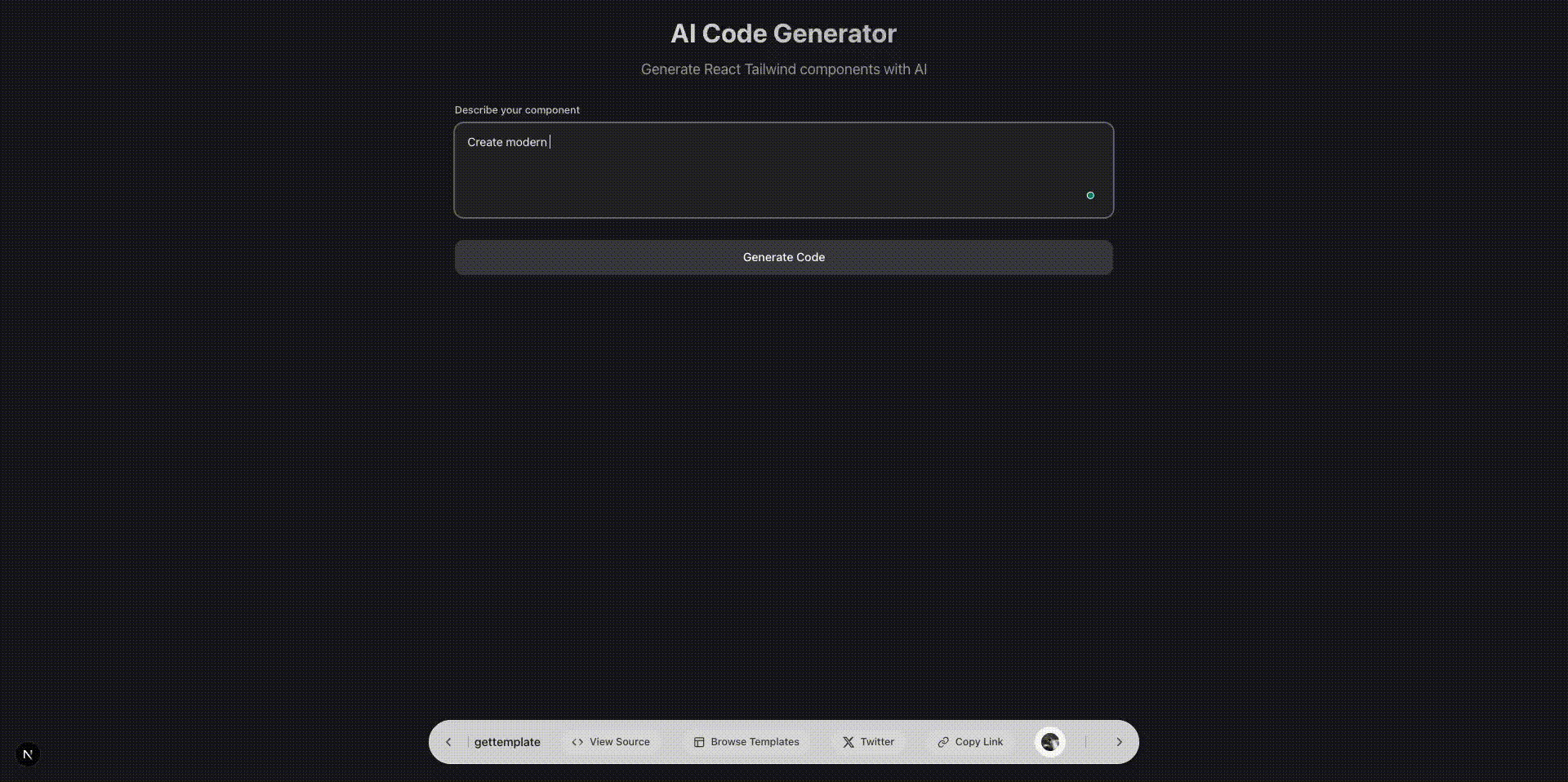
Hello, welcome to today's blog
In this section, I'll be sharing my simple AI React Tailwind Code generator to make sure we learn how to build AI apps as well as use the tool on our own.
Tech Stack
- Nextjs
- Tailwind
- Lucide icons
- React query (if needed)
- Vercel AI SDK (AI LLM API, Google Gemini in our case)
This doesn't have Vercel AI SDK packages, so install it accordingly, reading the docs.
App Flow
Single prompt from user that will be provided to AI LLM API endpoint as prompt or input, and AI will ®eturn React Tailwind source code using ƒew other packages
API endpoint, because this is always the most crucial part, and in our case, I am using Nextjs server-side endpoint to avoid creating my own server using Node and Express. It's a fast, reliable and simple endpoint provided by the Nextjs framework.
If you have your server in Node or FastAPI, then use it.
import { createOpenAI } from "@ai-sdk/openai";
import { convertToCoreMessages, smoothStream, streamText } from "ai";
import { createAnthropic } from "@ai-sdk/anthropic";
import { createGoogleGenerativeAI } from "@ai-sdk/google";
import { createMistral } from "@ai-sdk/mistral";
import { generateCodePrompt } from "../../../lib/prompts";

const openai = createOpenAI({
	apiKey: process.env.NEXT_PUBLIC_OPENAI_API_KEY,
});


const google = createGoogleGenerativeAI({
	apiKey: process.env.NEXT_PUBLIC_GOOGLE_API_KEY,
});


export const dynamic = "force-dynamic";


export default async function handler(req, res) {
	if (req.method !== "GET") {
		return res.status(405).json({
			success: false,
			error: {
				code: "METHOD_NOT_ALLOWED",
				message: "Only GET requests are allowed",
				status: 405,
			},
		});
	}

	try {
		const { prompt, temperature = 0.3 } = req.query;

		if (!prompt) {
			return res.status(400).json({
				success: false,
				error: {
					code: "MISSING_PROMPT",
					message: "Content is required",
					status: 400,
				},
			});
		}

		// Use the selected model provider

		const result = streamText({
			model: google("gemini-1.5-flash"),
			system: generateCodePrompt,
			messages: [
				{
					role: "user",
					content: `Generate a React component for this prompt:\n\n${content}`,
				},
			],
			temperature,
			stream: true,
			experimental_transform: smoothStream({ chunking: "word" }),
		});

		// Set headers for streaming response
		res.setHeader("Content-Type", "text/event-stream");
		res.setHeader("Cache-Control", "no-cache");
		res.setHeader("Connection", "keep-alive");

		let buffer = "";
		for await (const chunk of result.textStream) {
			buffer += chunk;
			res.write(chunk);
		}
		res.end();
	} catch (error) {
		console.error("API Error:", error);
		return res
			.status(500)
			.json({ error: "Internal Server Error", details: error.message });
	}
}
The system prompt will be discussed below.
Import the vercel AI streamText to stream the AI response
Define and initialise the Google provider for the Google Gemini LLM model in our case
Lastly, invoke the method by providing the LLM model along with messages, temperature, stream response configurations and more
Lastly, read and return the response in chunks from the API endpoint
I am not going into much detail, if you are following iHateReading blogs, you can understand and implement using the least source code without the entire code repository help.
System Prompt
The system prompt is the most important thing for any AI LLM application. Pay attention and break down the concepts to AI similar to the pattern you follow while developing or writing React Tailwind code.
A few things every system prompt should have are explanation, examples, error handling, edge cases and final format output, strict rules and sometimes punishment
export const generateCodePrompt = `You are a senior React architect and AI-powered code generator.
Your mission is to produce a single, self-contained React component that meets the user's requirements exactly.

OUTPUT FORMAT:
• Return only the component code wrapped in \`\`\`jsx and \`\`\` tags
• No explanations, comments, or markdown outside the code block
• Code should be in plain JSX (no TypeScript)

COMPONENT ISOLATION:
• Create a completely self-contained component that works independently
• Avoid using props for core functionality
• Keep all state management internal to the component
• Use local state (useState) for component-specific data
• Handle all data fetching and side effects within the component
• Include all necessary sub-components within the same file
• Make the component work without external dependencies
• Ensure the component can be used without configuration
• Keep the component focused on a single responsibility
• Avoid prop drilling by using internal state management

PACKAGE AVAILABILITY CHECK:
• Before using any package, check if it's available in the project
• If a package is not available, use alternative approaches or native solutions
• For UI components, prefer native HTML elements if a package is unavailable
• For animations, use CSS transitions/animations if GSAP/Framer Motion is unavailable
• For state management, use React's built-in useState/useReducer if Zustand is unavailable
• For data fetching, use fetch API if React Query/SWR is unavailable
• For forms, use native form elements if React Hook Form is unavailable
• For validation, use native HTML5 validation if Zod is unavailable

SUPPORTED LIBRARIES:
• React (hooks)
• Tailwind CSS
• Lucide-React
• react-icons (md, fa, fi, hi, bs)
• GSAP (for animations)
• Recharts (for data visualization)
• Three.js (for 3D/WebGL)
• Framer Motion (for advanced animations)
• React Query (for data fetching)
• Zustand (for state management)
• React Hook Form (for forms)
• date-fns (for date manipulation)
• React Table (for data tables)
• React Virtualized (for large lists)
• React DnD (for drag and drop)
• React Flow (for node-based interfaces)
• React PDF (for PDF generation)
• React Colorful (for color pickers)
• React Hot Toast (for notifications)
• React I18next (for internationalization)
• React Leaflet (for maps)
• React Markdown (for markdown rendering)
• React Player (for media playback)
• React Select (for enhanced select inputs)
• React Spring (for physics-based animations)
• React Window (for virtualized lists)
• React Zoom Pan Pinch (for image zoom)
• Socket.io-client (for real-time features)
• SWR (for data fetching)
• Zod (for schema validation)

REQUIREMENTS:
1. Single Component
   • Generate exactly one default-exported functional component
   • Use either function or arrow syntax

2. Imports
   • Include all necessary imports at the top (React, icons, gsap, etc.)
   • Do not import unused packages

3. Styling
   • Use Tailwind CSS classes exclusively (e.g. zinc-900, rounded-xl, shadow)
   • Adhere to color and spacing tokens: p-4, gap-4, focus:ring-2 focus:ring-zinc-900 focus:ring-offset-2
   • Use zinc-900 as primary color
   • Use rounded-xl and rounded-full for border radius (avoid rounded-md)
   • Use border radius for all fields and html elements unless mentioned for no border radius
   • No outline on input and other fields

4. Functionality & Edge Cases
   • Handle loading, error, and empty states
   • Validate inputs and guard against invalid props
   • Include ARIA attributes for accessibility where relevant

5. Performance
   • Optimize re-renders (e.g. React.memo, useCallback, useMemo)
   • Clean up side effects (e.g. GSAP timelines in useEffect)

6. Animations
   • If dynamic visuals are needed, use GSAP with proper cleanup
   • Keep animations performant (duration ≤ 0.5s)

7. Accessibility
   • Add aria- attributes and keyboard handlers for interactive elements
   • Ensure focus management and visible focus rings

Example Structure:
\`\`\`jsx
import { useState } from 'react';
import { MdEmail, MdLock } from 'react-icons/md';

const Loader = () => (
  <div className="animate-spin rounded-full h-8 w-8 border-b-2 border-zinc-900"></div>
);

const LoginForm = () => {
  const [email, setEmail] = useState('');
  const [password, setPassword] = useState('');
  const [isLoading, setIsLoading] = useState(false);
  const [error, setError] = useState(null);

  const handleSubmit = async (e) => {
    e.preventDefault();
    setIsLoading(true);
    setError(null);

    try {
      if (!email || !password) { throw new Error('Email and password are required.'); }
      if (!email.includes('@')) { throw new Error('Invalid email address.'); }
      await new Promise((r) => setTimeout(r, 1000));
      console.log('Login successful:', email, password);
    } catch (err) {
      setError(err.message);
    } finally {
      setIsLoading(false);
    }
  };

  return (
    <form onSubmit={handleSubmit} className="mx-auto max-w-md p-4 rounded-xl shadow-md border">
      <h2 className="text-2xl font-bold text-zinc-900 mb-4">Login</h2>
      {error && (
        <div className="p-2 mb-4 text-red-500 bg-red-50 rounded-xl border border-red-200">
          {error}
        </div>
      )}
      <div className="mb-4">
        <label htmlFor="email" className="block text-gray-700 font-bold mb-2">Email</label>
        <div className="relative">
          <MdEmail className="absolute left-2 top-1/2 -translate-y-1/2 text-zinc-900" />
          <input
            type="email"
            id="email"
            value={email}
            onChange={(e) => setEmail(e.target.value)}
            required
            className="w-full px-8 py-2 rounded-md border border-gray-300 focus:ring-2 focus:ring-zinc-900 focus:ring-offset-2"
            placeholder="Enter your email"
            aria-label="Email address"
          />
        </div>
      </div>
      <div className="mb-4">
        <label htmlFor="password" className="block text-gray-700 font-bold mb-2">Password</label>
        <div className="relative">
          <MdLock className="absolute left-2 top-1/2 -translate-y-1/2 text-zinc-900" />
          <input
            type="password"
            id="password"
            value={password}
            onChange={(e) => setPassword(e.target.value)}
            required
            className="w-full px-8 py-2 rounded-md border border-gray-300 focus:ring-2 focus:ring-zinc-900 focus:ring-offset-2"
            placeholder="Enter your password"
            aria-label="Password"
          />
        </div>
      </div>
      <button
        type="submit"
        disabled={isLoading}
        className="w-full px-4 py-2 bg-zinc-900 text-white rounded-xl hover:bg-zinc-800 focus:ring-2 focus:ring-zinc-900 focus:ring-offset-2 disabled:opacity-50 disabled:cursor-not-allowed transition-colors shadow-sm"
      >
        {isLoading ? <Loader /> : 'Login'}
      </button>
    </form>
  );
};

export default LoginForm;
\`\`\`

Remember:
• NO TypeScript, only JSX code
• Use react-icons from appropriate categories (md, fa, fi, hi, bs)
• Use zinc-900 as the primary colour
• Handle all edge cases and error states
• Make the component production-ready
• Include essential UI elements for the component type
• Use proper border radius (rounded-xl, rounded-md, rounded-full)
• Include a Loader component for loading states
• Handle all edge cases properly
• Use proper styling for all HTML elements`;
Read the system prompt carefully, more states, edge cases regarding packages and version managers, and the latest open-source code are missing or not handled for production, we do have to cover those cases as well.
When I read about Vercel v0.dev system prompt, they even have defined the MATHS equations within the system prompt, HOW COOL is THAT
Going in-depth is important.
Frontend
Once the API endpoint is ready, we need an Input to enter a prompt and a submit button to invoke the above API endpoint and a code highlighter to show the React Tailwind AI code
import React, { useState } from "react";

const AICodeGenerator = () => {
	const [prompt, setPrompt] = useState("");
	const [generatedCode, setGeneratedCode] = useState("");
	const [isLoading, setIsLoading] = useState(false);
	const [error, setError] = useState("");

	const handleSubmit = async (e) => {
		e.preventDefault();
		if (!prompt.trim()) return;

		setIsLoading(true);
		setError("");
		setGeneratedCode("");

		try {
			const response = await fetch("/api/generate-code", {
				method: "POST",
				headers: {
					"Content-Type": "application/json",
				},
				body: JSON.stringify({ prompt }),
			});

			if (!response.ok) {
				throw new Error("Failed to generate code");
			}

			const reader = response.body.getReader();
			const decoder = new TextDecoder();
			let code = "";

			while (true) {
				const { done, value } = await reader.read();
				if (done) break;

				const chunk = decoder.decode(value);
				code += chunk;
				setGeneratedCode(code);
			}
		} catch (err) {
			setError("Error generating code. Please try again.");
			console.error("Error:", err);
		} finally {
			setIsLoading(false);
		}
	};

	const copyToClipboard = () => {
		navigator.clipboard.writeText(generatedCode);
	};

	return (
		<div className="min-h-screen bg-zinc-900 text-zinc-100 p-6">
			<div className="max-w-4xl mx-auto space-y-8">
				{/* Header */}
				<div className="text-center space-y-4">
					<h1 className="text-4xl font-bold bg-gradient-to-r from-zinc-100 to-zinc-400 bg-clip-text text-transparent">
						AI Code Generator
					</h1>
					<p className="text-zinc-400 text-xl">
						Generate React Tailwind components with AI
					</p>
				</div>

				{/* Input Form */}
				<form onSubmit={handleSubmit} className="space-y-6">
					<div className="space-y-2">
						<label
							htmlFor="prompt"
							className="block text-sm font-medium text-zinc-300"
						>
							Describe your component
						</label>
						<textarea
							id="prompt"
							value={prompt}
							onChange={(e) => setPrompt(e.target.value)}
							placeholder="e.g., Create a modern animated button with hover effects"
							className="w-full h-32 px-4 py-3 bg-zinc-800 border border-zinc-700 rounded-xl focus:ring-2 focus:ring-zinc-500 focus:border-transparent resize-none text-zinc-100 placeholder-zinc-500 outline-none focus:outline-none"
							disabled={isLoading}
						/>
					</div>

					<button
						type="submit"
						disabled={isLoading || !prompt.trim()}
						className="w-full px-6 py-3 bg-zinc-700 hover:bg-zinc-600 disabled:bg-zinc-800 disabled:cursor-not-allowed text-white font-medium rounded-xl transition-colors duration-200 flex items-center justify-center space-x-2"
					>
						{isLoading ? (
							<>
								<div className="w-5 h-5 border-2 border-zinc-300 border-t-transparent rounded-full animate-spin"></div>
								<span>Generating...</span>
							</>
						) : (
							<span>Generate Code</span>
						)}
					</button>
				</form>

				{/* Error Message */}
				{error && (
					<div className="p-4 bg-red-900/20 border border-red-700 rounded-xl">
						<p className="text-red-400">{error}</p>
					</div>
				)}

				{/* Generated Code */}
				{generatedCode && (
					<div className="space-y-4">
						<div className="flex items-center justify-between">
							<h2 className="text-xl font-semibold text-zinc-200">
								Generated Code
							</h2>
							<button
								onClick={copyToClipboard}
								className="px-4 py-2 bg-zinc-700 hover:bg-zinc-600 text-zinc-200 text-sm font-medium rounded-xl transition-colors duration-200"
							>
								Copy Code
							</button>
						</div>

						<div className="relative">
							<pre className="bg-zinc-800 border border-zinc-700 rounded-xl p-6 overflow-x-auto">
								<code className="text-zinc-100 text-sm leading-relaxed">
									{generatedCode}
								</code>
							</pre>
						</div>
					</div>
				)}
			</div>
		</div>
	);
};

export default AICodeGenerator;
I have added a few conditions like loading skeleton, handling errors or edge cases for code syntax before pushing it in the production.
Source code on gettemplate.website, yup, we have a dedicated platform to share source code of whatever we build on iHateReading, do check it or gettemplate.website
That's it for today
See you in the next one
Summary
This blog post details a React/Tailwind CSS code generator powered by a Google Gemini AI LLM (Large Language Model). The author provides a Next.js API endpoint that receives a user prompt, sends it to the Gemini API, and returns streamed React/Tailwind code. The frontend uses a simple form for user input and displays the generated code using a code highlighter. A crucial element is a sophisticated system prompt that instructs the AI on code formatting, style requirements (Tailwind CSS, Lucide icons), error handling, and package usage. The complete frontend and backend code snippets, along with a link to a starter repository (requiring Vercel AI SDK installation), are included. The blog emphasizes the importance of a well-crafted system prompt for optimal AI-generated code.