Hello and welcome to new blog
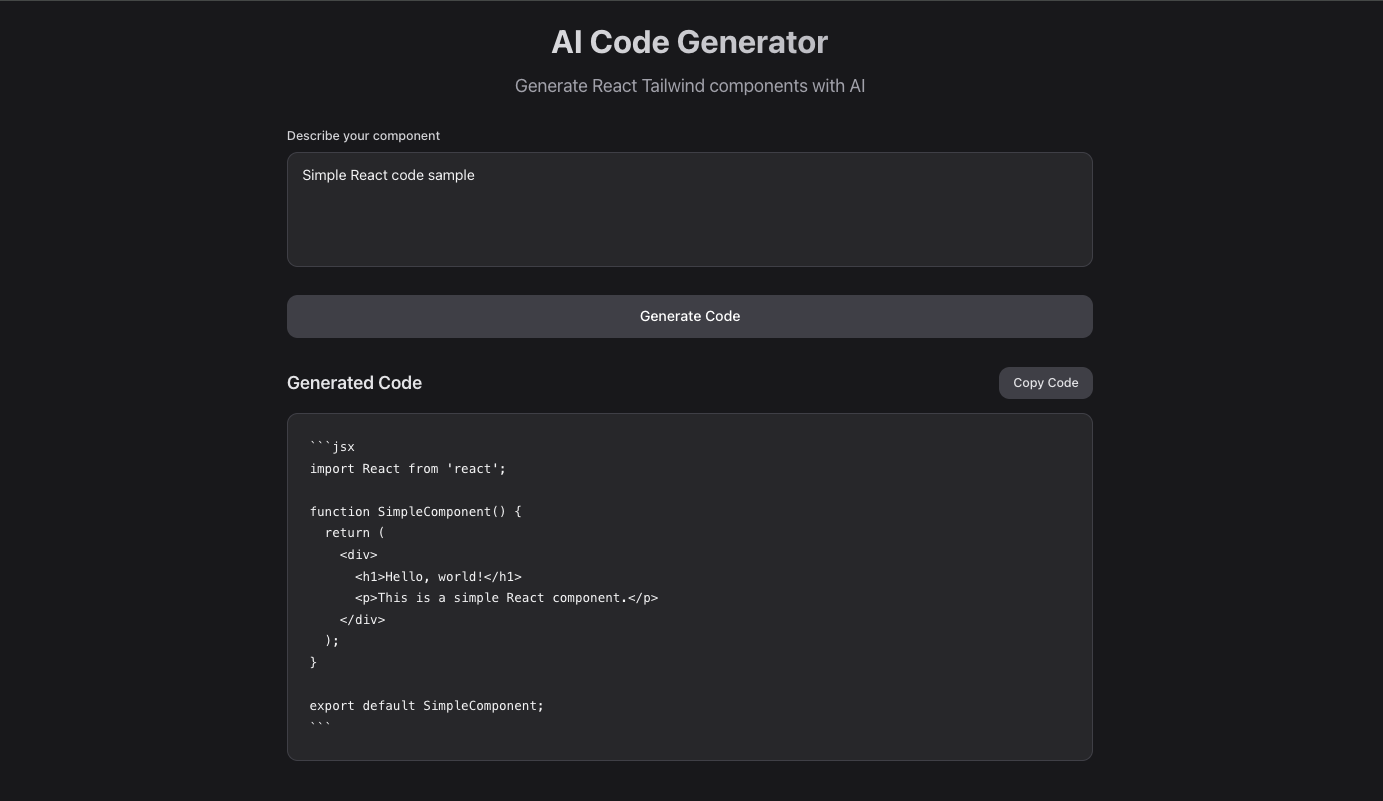
In today' section, we will be learning and building React AI Code generator that simply takes user inputs and provide React code using AI.
I've been writing on iHateReading(ihatereading.in) for almost 3 years and have written 400 blogs. Each or most of the blogs need to share source code either via a Github repository or by providing sample code inside the blog
Another alternative solution I've found is to release this gettemplate.website, the collection of React, HTML, Next and Vite template.
This single platform is like Dribbble but more like Evanto and Theme Forest, meaning it inspires, along with source code for multiple frameworks of your choice. Real World ExampleYesterday, one of our readers wanted to develop an AI code editor and later on-
We shared the AI React Code generator gettemplate template (https://lnkd.in/d8Y2bjb3) along with Next.js and React source code - Quickly, within few hours, along with AI, the developer can build an AI React Code generatorIn just 2 steps, one can quickly bring ideas into a reality, test in the market and later plan to scale in the ERA of 2025, AI is making development a cake-walk and gettemplate.website is certainly the key product if not today will be in future.
Tech Stack
- Next.js
- React
- Tailwind
- Lucide Icons
- Vercel AI SDK
- Google Gemini Model (API Key)
- Firebase (if needed)
By the way, anyone wants source code, AI React Code Generator and don't worry we will learn today, how to build one
AI LLM API
Vercel AI SDK provides a wrapper or provider wrapping AI LLM API under the hood for developers to use AI within frontend applications just via API call. In our last blog, we have discussed thoroughly the AI Chat App using Vercel AI SDK.
In this thread, we will be using same, since we are using Next.js so invoking AI LLM to provide source code we will be using Next.js server side API.
Inside pages directory, create "api" directory or folder, this directory contains any folder/file will be treated as file-based routing.
For example, api/chat/route.js or api/chat/route.ts, both file inside pages/api directory is the exposed backend API route endpoint and can be accessed in the client side using axios as shown below
const response = await axios.get('/api/chat', { prompt: "Create simple React component for my blog website", })

const code = reponse.json();
Moving ahead, our endpoint is bit different since we want AI to provide React code using the user prompt.
import { streamText } from "ai";
import { createGoogleGenerativeAI } from "@ai-sdk/google";
import { generateCodeSystemPrompt } from "../../../lib/utils/generateCodePrompt";

const googleClient = createGoogleGenerativeAI({
	apiKey: process.env.NEXT_PUBLIC_GOOGLE_API_KEY,
});

export default async function handler(req, res) {
	if (req.method !== "POST") {
		return res.status(405).json({ error: "Method Not Allowed" });
	}

	try {
		const { prompt } = req.body;

		const result = await streamText({
			model: googleClient("gemini-1.5-flash"),
			messages: [
				{
					role: "system",
					content: generateCodeSystemPrompt(),
				},
				{
					role: "user",
					content: prompt,
				},
			],
			temperature: 0.8,
			streamProtocol: true,
		});

		try {
			for await (const chunk of result.textStream) {
				res.write(chunk);
			}

			try {
				res.end();
			} catch (error) {
				console.error("Error processing response:", error);
				res.status(500).json({
					error: "Invalid JSON response from AI",
					details: error.message,
				});
			}
		} catch (streamError) {
			console.error("Streaming error:", streamError);
			res
				.status(500)
				.json({ error: "Streaming error", details: streamError.message });
		}
	} catch (error) {
		console.error("API Error:", error);
		return res
			.status(500)
			.json({ error: "Internal Server Error", details: error.message });
	}
}
- First we import the Vercel AI SDK packages
- Define the Google Gemini AI model with API key
- Define API POST method accepting user prompt as input in request body
- Further invoking AI instance using System Prompt and user prompt
I am not going into too much detail about System Prompt, once can define on it's own also because on in our previous blog we have discussed this system prompt.
Frontend
In the client side, we need to access the API endpoint using axios as explained above.
import React, { useState } from "react";

const AICodeGenerator = () => {
	const [prompt, setPrompt] = useState("");
	const [generatedCode, setGeneratedCode] = useState("");
	const [isLoading, setIsLoading] = useState(false);
	const [error, setError] = useState("");

	const handleSubmit = async (e) => {
		e.preventDefault();
		if (!prompt.trim()) return;

		setIsLoading(true);
		setError("");
		setGeneratedCode("");

		try {
			const response = await fetch("/api/generate-code", {
				method: "POST",
				headers: {
					"Content-Type": "application/json",
				},
				body: JSON.stringify({ prompt }),
			});

			if (!response.ok) {
				throw new Error("Failed to generate code");
			}

			const reader = response.body.getReader();
			const decoder = new TextDecoder();
			let code = "";

			while (true) {
				const { done, value } = await reader.read();
				if (done) break;

				const chunk = decoder.decode(value);
				code += chunk;
				setGeneratedCode(code);
			}
		} catch (err) {
			setError("Error generating code. Please try again.");
			console.error("Error:", err);
		} finally {
			setIsLoading(false);
		}
	};

	const copyToClipboard = () => {
		navigator.clipboard.writeText(generatedCode);
	};

	return (
		<div className="min-h-screen bg-zinc-900 text-zinc-100 p-6">
			<div className="max-w-4xl mx-auto space-y-8">
				{/* Header */}
				<div className="text-center space-y-4">
					<h1 className="text-4xl font-bold bg-gradient-to-r from-zinc-100 to-zinc-400 bg-clip-text text-transparent">
						AI Code Generator
					</h1>
					<p className="text-zinc-400 text-xl">
						Generate React Tailwind components with AI
					</p>
				</div>

				{/* Input Form */}
				<form onSubmit={handleSubmit} className="space-y-6">
					<div className="space-y-2">
						<label
							htmlFor="prompt"
							className="block text-sm font-medium text-zinc-300"
						>
							Describe your component
						</label>
						<textarea
							id="prompt"
							value={prompt}
							onChange={(e) => setPrompt(e.target.value)}
							placeholder="e.g., Create a modern animated button with hover effects"
							className="w-full h-32 px-4 py-3 bg-zinc-800 border border-zinc-700 rounded-xl focus:ring-2 focus:ring-zinc-500 focus:border-transparent resize-none text-zinc-100 placeholder-zinc-500 outline-none focus:outline-none"
							disabled={isLoading}
						/>
					</div>

					<button
						type="submit"
						disabled={isLoading || !prompt.trim()}
						className="w-full px-6 py-3 bg-zinc-700 hover:bg-zinc-600 disabled:bg-zinc-800 disabled:cursor-not-allowed text-white font-medium rounded-xl transition-colors duration-200 flex items-center justify-center space-x-2"
					>
						{isLoading ? (
							<>
								<div className="w-5 h-5 border-2 border-zinc-300 border-t-transparent rounded-full animate-spin"></div>
								<span>Generating...</span>
							</>
						) : (
							<span>Generate Code</span>
						)}
					</button>
				</form>

				{/* Error Message */}
				{error && (
					<div className="p-4 bg-red-900/20 border border-red-700 rounded-xl">
						<p className="text-red-400">{error}</p>
					</div>
				)}

				{/* Generated Code */}
				{generatedCode && (
					<div className="space-y-4">
						<div className="flex items-center justify-between">
							<h2 className="text-xl font-semibold text-zinc-200">
								Generated Code
							</h2>
							<button
								onClick={copyToClipboard}
								className="px-4 py-2 bg-zinc-700 hover:bg-zinc-600 text-zinc-200 text-sm font-medium rounded-xl transition-colors duration-200"
							>
								Copy Code
							</button>
						</div>

						<div className="relative">
							<pre className="bg-zinc-800 border border-zinc-700 rounded-xl p-6 overflow-x-auto">
								<code className="text-zinc-100 text-sm leading-relaxed">
									{generatedCode}
								</code>
							</pre>
						</div>
					</div>
				)}
			</div>
		</div>
	);
};

export default AICodeGenerator;
In the above source code, we have created a simple input form with submit button, the input text is the prompt provided by the user to the AI LLM for code output.
As seen above, once the AI provide the response we simply render it below inside pre and code HTML DOM component.
CRUD (Create, Read, Delete, Update)
Next comes to CRUD operations, Create, React, Delete & Update the React code.
Few things to build is
- User can save the React code
- User can delete and further edit the React code using AI as well
- User can share the component with others
For storing we certainly need a storage and database and Firebase, Supabase and lot more alternatives are available.
Storing Code
import { Timestamp } from "firebase/firestore";

async function createSourceCode(data) {
  const newDoc = {
    name: data.name || "",
    prompt: data.prompt || "",
    code: data.code || "",
    timestamp: Timestamp.now(),
    updatedAt: Timestamp.now(),
    author: data.author || "",
  };

  const docRef = await db.collection("SourceCodes").add(newDoc);
  return docRef.id; // returns the ID of the new document
}
Fetch All Code
async function getAllSourceCodes() {
  const snapshot = await db.collection("SourceCodes").orderBy("timestamp", "desc").get();
  return snapshot.docs.map(doc => ({ id: doc.id, ...doc.data() }));
}
Update Existing Code
async function updateSourceCode(id, updatedFields) {
  await db.collection("SourceCodes").doc(id).update({
    ...updatedFields,
    updatedAt: Timestamp.now(),
  });
}
Delete Source Code
async function deleteSourceCode(id) {
  await db.collection("SourceCodes").doc(id).delete();
}
Once this is done, our simple full-stack AI React Code Generator is completed and React to use.
Once can argue regarding now providing authentication and few more details.
I don't want to make this blog long, so will cover only few details.
Authentication
Few ways to add authentication along with few authentication flows:
- Email and Password Authentication
- Google and Other Social Media Authentication
Firebase, Supabase, Next-Auth, BetterAuth and Clerk among 4 Free and easy to use options one can prefer anything of their choice.
Use cookies or local storage or session management to handle user authentication state within the application and Redux is also the best choice for the state management.
Conclusion
Building React AI Code generator using AI LLM in Nextjs and Vercel AI SDK is quite easy
Summary
This blog post describes building a full-stack React AI code generator using Next.js, the Vercel AI SDK, and the Google Gemini model. The application takes user prompts to generate React code via a serverless API function. The frontend uses React and Tailwind CSS, while the backend leverages the Vercel AI SDK to interact with the Google Gemini API. The post includes code examples for the API endpoint (using streamText for efficient code streaming) and the React frontend, showing how to handle user input, API calls, code display, and copying to the clipboard. Finally, it briefly discusses adding CRUD operations (create, read, update, delete) for code storage (using Firebase as an example) and authentication options (Firebase, Supabase, NextAuth, BetterAuth, and Clerk).