Hello and welcome to the new blog
Today, we will be covering a small but important use case of image compression methods.
While writing this kind of blog for our audience, we prefer using our own custom Editor as shown in the image below
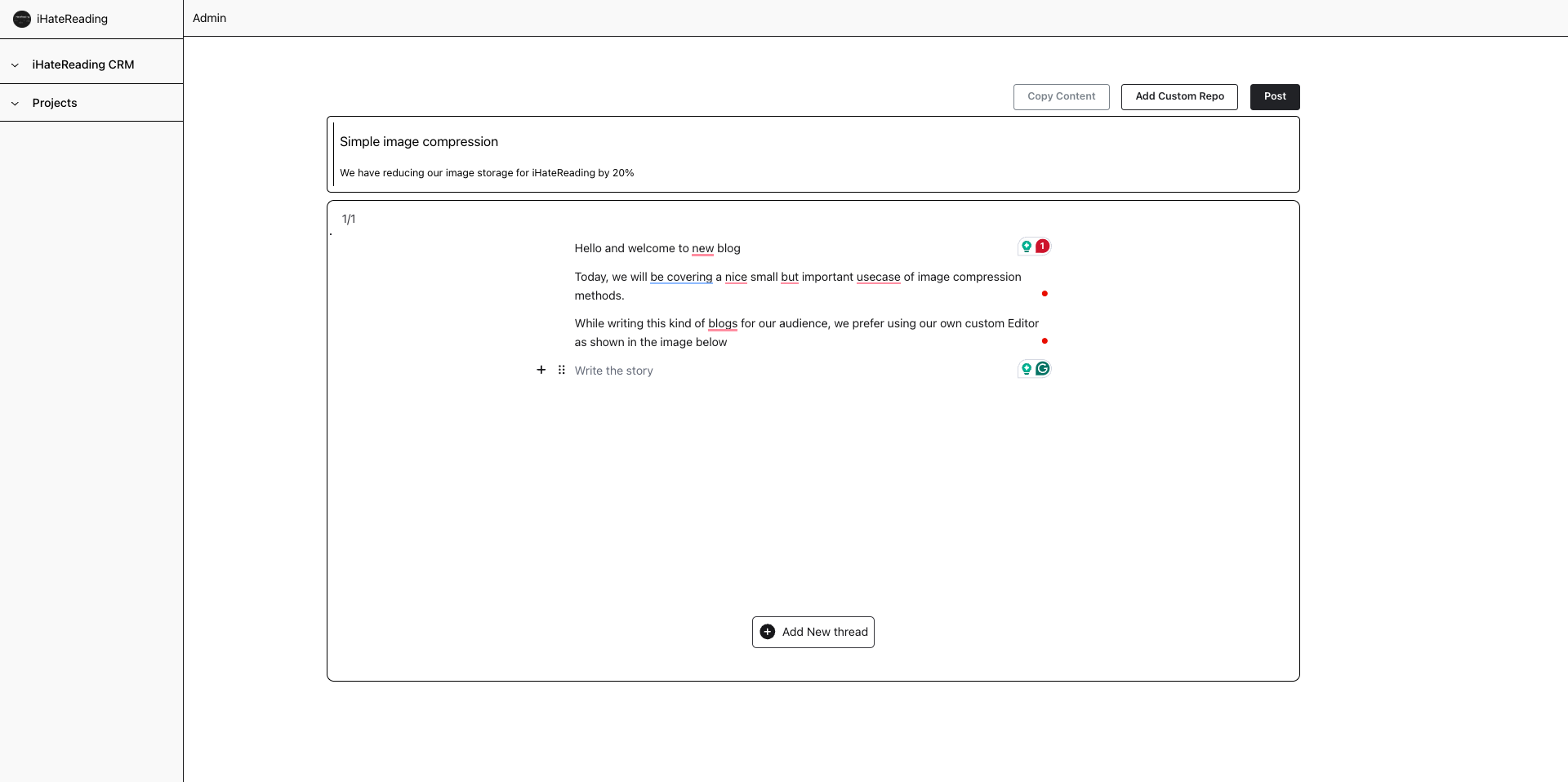
Now, one can make this kind of Editor on their using
- Editorjs
- Tiptap Editor
- Markdown Editor
However, each editor needs images and videos to manage and then store in the database. Storing images directly from the editor to the storage, like AWS or Firebase storage, will take a huge amount of space
Compression is the best alternative apart from other big alternatives and I am only talking about client side image compression, compress and reduce the size of an image and store automatically the reduced size inside storage.
Browser Image Compression
https://www.npmjs.com/package/browser-image-compression
This single package helps to reduce the image size by far, almost more than 20% without compromising much on the quality side.
One can even use ffmpeg as well, https://www.npmjs.com/package/ffmpeg
One single method and the uploaded image can be compressed as shown below
async function handleImageUpload(event) {

  const imageFile = event.target.files[0];
  console.log('originalFile instanceof Blob', imageFile instanceof Blob); // true
  console.log(`originalFile size ${imageFile.size / 1024 / 1024} MB`);

  const options = {
    maxSizeMB: 1,
    maxWidthOrHeight: 1920,
    useWebWorker: true,
  }
  try {
    const compressedFile = await imageCompression(imageFile, options);
    console.log('compressedFile instanceof Blob', compressedFile instanceof Blob); // true
    console.log(`compressedFile size ${compressedFile.size / 1024 / 1024} MB`); // smaller than maxSizeMB

    await uploadToServer(compressedFile); // write your own logic
  } catch (error) {
    console.log(error);
  }

}
How cool is that, once you get the compressed image file store is directly inside storage.
Just a few lines of code in React before uploading data in the backend database will certainly optimise the application by far.
Also prefer using image lazy loading on the client side while fetching and rendering the images, if using Next.js, then usethe Image component from next/image or simply use the "lazy" prop for the img tag
<img loading="lazy" src="" />
That's it for today, see you in the next one
iHateReading
Summary
This blog post discusses client-side image compression for web applications using rich text editors like Editor.js, Tiptap, or Markdown Editor. Storing uncompressed images consumes significant storage space; therefore, the author recommends using the browser-image-compression npm package (or alternatively, ffmpeg) to reduce image size before uploading to storage services like AWS or Firebase. A code example demonstrates how to compress images using this package, achieving over 20% size reduction without significant quality loss. The post also suggests using image lazy loading (loading="lazy" attribute) for further optimization.